The new wave of information governance tools – what do they mean for records management?

A new wave of tools has hit the records management space over the past two or three years:

  • eDiscovery indexing engines that aim to index all of an organisation’s content across however many repositories/applications it uses
  • in-place records management tools that aim to apply classification and retention rules to content regardless of the repository/application in which it is kept
  • e-mail archive tools that are more ambitious than the previous generation of e-mail archives, and which, for example, offer features supporting the auto-classification of e-mail
  • plug-ins for SharePoint to bridge the gaps in records management functionality
  • clean-up tools for shared drives

All of these tools can be placed under the the collective description of ‘information governance tools’.  But they are very different from each other.

One way in which we can categorise these new tools is by the ambitions of the organisations deploying them:

  • An organisation with a big eDiscovery bill but little records management ambition will turn to indexing engines to give them the reassurance that they can identify material responsive to litigation cases even if individual staff continue to leave correspondence in their e-mail accounts and do nothing more with documents than stick them in a folder on a shared drive.
  • Organisations wanting to reduce the load of burden of maintaining (and reviewing when an eDiscovery/access to information request comes in) vast volumes of documentation on shared drives will deploy a shared drive plug in tool to protect and classify material of value, whilst identifying and getting rid of ROT (redundant, outdated and trivial) documentation.
  • Organisations concerned about e-mail volumes, and  with the potential existence of toxic comments and information within e-mails, will deploy e-mail archiving tools. They will either use auto-classification features to filter e-mails into categories and apply disposition rules,  or they will use analytics features aimed at identifying  high risk/trivial/private communications .  The auto-classification tools are indeed getting more and more sophisticated but the applications of  auto-classification tools are still crude.  You need to train an auto-classification tool how to recognise material relevant to every single category in whatever classification you are using.  The more granular the classification the more training you have to give the auto-classification tool.  For the time being at least you can only realistically auto-classify into ‘big buckets’.
  • Organisations with records management ambitions and with big investments in SharePoint will deploy SharePoint plugs ins.  The plug-ins will enable them to:  link retention rules to their records classification;  apply the classification and retention rules to different types of SharePoint objects:  (folders/content types/libraries/sites) ;  and better import and export content into and out of SharePoint.  The plug ins will also give them e-mail integration so that staff can drag and drop e-mail into SharePoint libraries.  The challenge here is that even a drag-and-drop facility does not on its own motivate end-users to consistently move significant material out of their e-mail accounts
  • Organisations wanting to manage records across several different environments (typically shared drive, e-mail SharePoint), without asking staff to move records into a separate electronic records management system, will deploy in-place records management tools.  In effect these tools will give you much of what a  SharePoint plug-in tool and a shared drive clean-up/governance tool will do, and some of the things an e-mail archive might do. They will also offer connectors to the major enterprise content management system/document management system products on the market.   So long as the vendor of the tool remains viable and keeps coming up with connectors for new repositories you in theory have an approach to managing records across your whole IT estate.   The success of in-place vendors will depend upon the extent to which they can convince organisations that the synergy of having one tool to manage records across many applications outweighs the option to pick best-of-breed solutions for each particular application/repository (e-mail/shared drive/SharePoint).     The challenge for organisations is that each repository/application that they are trying to govern has its own unique features, structure and functionality.   This means that the in-place tool has to work in a different way to govern content in each separate application. The deployment of an in-place tool to each different application/repository is a separate project in its own right.

In practice we are already seeing convergence between these products as vendors either move into each others territory, or ally with each other.  We are also seeing convergence between these products and the previous generation of  electronic records management systems

  • We are seeing vendors of indexing engines such as Zylab and Nuix moving more deeply into  information governance by adding functionality to  clean-up and apply rules to the repositories that they have indexed.
  • We are seeing the vendors of traditional electronic records management systems such as IBM and HP Autonomy use their electronic records management systems as repositories  behind their in-place records management  offerings.  Even when an organisation adopts an in-place records management approach they are still going to want to decommission applications at some point and hence need to be able to move content out of those applications into a repository.
  • We are seeing alliances between vendors of these different products – for example that between RSD and Nuix to offer both in-place records management and indexing/eDiscovery capabilities.

There are numerous  questions for us to explore concerning the implications of the rise of these tools are for records management.

  • Is records management being subsumed into information governance – or is it a separate discipline that will help to shape information governance but will retain its own distinct identity and purpose?
  • What are the fundamental differences between this wave of information governance tools, and the wave of ‘electronic document and records management systems’ that dominated the records management market between 1999 and 2009?
  • Does this new wave of information governance form part of a wider change in records management paradigm? Are we seeing a new model of how records management should be tackled?    If so to what extent is it a fully worked through paradigm?  What are the underpinning set of beliefs behind it?   Is there a body of theory behind it?
  • To what extent will such a new records management paradigm meet the aspirations of the profession?   Will it work in practice?  What would it need from organisations, from records managers, from end-users and from vendors in order to make it work?

An approach to archiving e-mails that makes them manageable, shareable, findable and useful (case study from the Food and Agriculture Organisation of the United Nations)

The Food and Agriculture Organisation (FAO) of the United Nations (UN), with its HQ in Rome,  exists to ‘spearhead international efforts to defeat hunger and build a food-secure world for present and future generations’.

Last week I recorded a podcast with Ian Meldon, a records management consultant working for the FAO,  in which Ian described the approach of FAO to implementing a records management system based around e-mail.

FAO have had a system for managing electronic records for over a decade, and the system has always been based on e-mail.  They recently replaced their old system with a new approach.  The new approach involves:

  • filtering out personal and trivial messages, so that significant messages can be managed and shared
  • providing colleagues with ways of keeping abreast of the work e-mail traffic of team-mates, without those team mates having to copy each other into those e-mails.
  • applying a records classification to significant e-mail messages without asking colleagues to interact with that corporate records classification

The previous records management system at FAO

From the year 2000 FAO had asked colleagues to copy or forward any e-mail needed as a record to the e-mail address of their local registry, where registry staff would file the e-mail in a Microsoft Outlook shared folder structure.    The system worked tolerably well, although compliance with the policy varied from area to area.

One weakness of the previous system was that all the records were kept within the Microsoft Exchange environment. People could only see the records of their local area – there was no possibility of a FAO wide search.  There was no sustainable way of holding and applying retention rules to the records.

Principles behind FAO’s new records management system

When FAO decided to overhaul the records system they based their approach on three principles:

  • Don’t appear to introduce a yet another computer system  FAO have procured and implemented a robust electronic records management system (Filenet from IBM), for use as their repository.  But end-users never need interact directly with the Filenet repository – everything they need to do on the system can be done through the Outlook e-mail client.
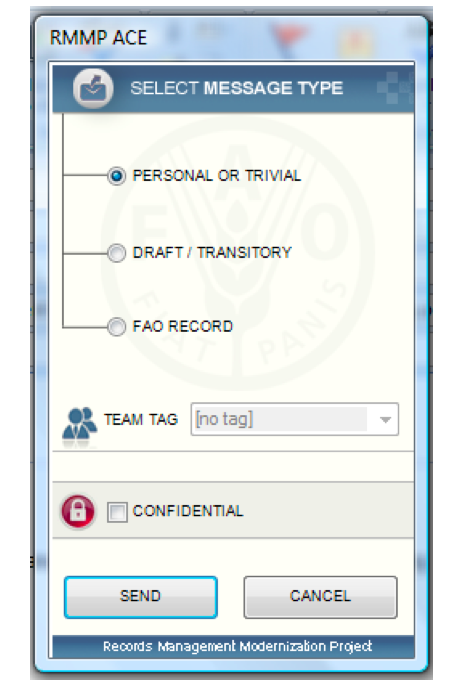
  • Don’t ask people to do something they are not already doing The idea was not to ask users to do anything more time consuming than the previous system’s demand that they copy in the registry to significant e-mails.  Under the new system every time a colleague sends an e-mail, a records capture pop-up appears asking them to say whether the e-mail is either a) personal or trivial or b) draft/transitory or c) FAO record.   If an individual selects personal or trivial then the e-mail is sent without going into the records repository.  If the individual selects either draft/transitory or FAO record then they are asked to choose the appropriate ‘team tag’  for the message (the team tag denotes which team they were working for in sending the message). The message then gets sent and a copy is placed in the records repository.  There is also the opportunity to mark a message as confidential if it is work related but there is a need to restrict access to it.

Screen Shot 2013-07-07 at 08.12.03

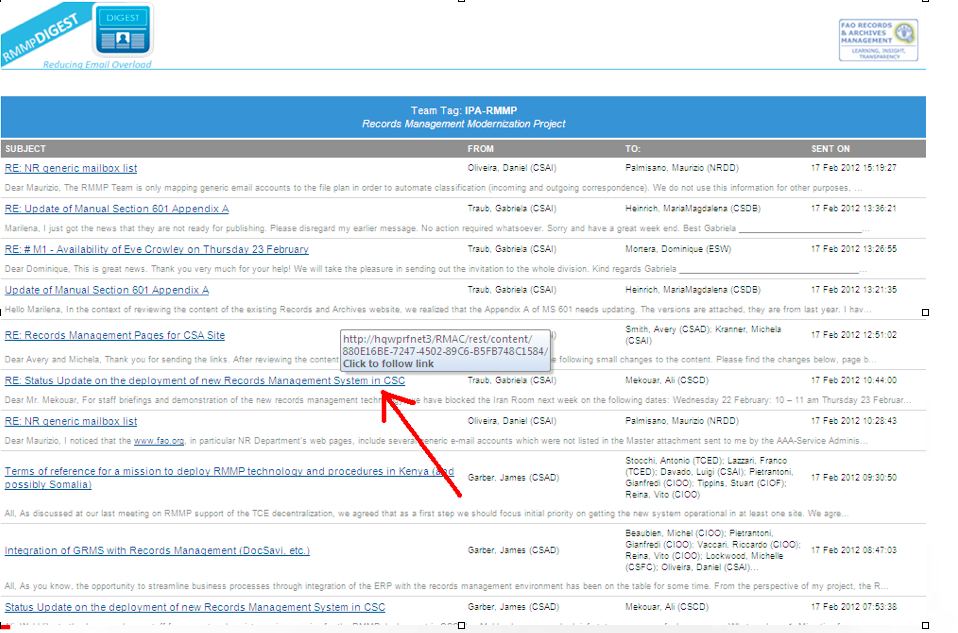
  • Provide something useful beyond the need to keep records At 10pm every night the system generates a ‘digest’ for each team tag.  The digest is an e-mail that lists and links to all the FAO Record e-mails sent that day and tagged with that team tag.  This means that each morning an individual can see at a glance all the significant e-mails sent by colleagues in their team the previous day.  This has reduced the need for colleagues to ‘copy each other in’ to e-mails.  Furthermore individuals can choose to receive digests from other teams (if they have appropriate permissions).  If a manager oversees six or seven teams they can look at the digest for the six or seven team tags each morning, without needing to be copied into hundreds of e-mails.
Team tag digest for the Records Management Modernisation Project
Team tag digest for tag ‘IPA-RMMP’ (the Records Management Modernisation Project) on 17 February 2012

The illustration above shows the team tag digest e-mail generated by the records system for the team tag ‘IPA-RMMP (the Records Management Modernisation Project)  on 17 February 2012.   Members of the team, plus anyone who had decided to subscribe to that team tag, would have received that digest late on the 17 February.  It gives them the subject line and first line of each e-mail.  It is presented in reverse-chronological order by time sent.   The digest is simply an automatically generated search query.   Any colleague can search the records repository from their Outlook client and generate a similar report, showing the FAO Record e-mails of any team over any time period, provided only that they have appropriate permissions for that team tag.    

The nature of the team tags

FAO created team tags by simply asking every area of the organisation to identify what teams they had, and who worked in those teams.

Team tags are maintained by registry/records management staff who create new team tags when new teams or project teams emerge, assign individuals to membership of particular team tags, and maintain the access permissions around team tags.

An individual might belong to one, two or several teams.  When they send an e-mail from the Outlook client the records capture pop-up asks them to assign a team tag to it if they have marked it as draft/transitory or FAO record.  

The pop-up presents them with a drop-down list of the teams they are assigned to.   If the individual is assigned to only one team then they have no choice to make – the team tag will be filled in automatically.

Application of the record classification

FAO created a records classification based on a functional analysis of the activities of their organisation.

The challenge was how to apply the records classification to the records that would build up in the system.   If FAO had asked individual users to place each e-mail into a file within that records classification then it would have broken their principle of not asking people to do something they were not already doing (in FAO’s previous system registry staff had placed e-mails on files on behalf of end-users).

Experiments with auto-classification

The first approach FAO trialled was auto-classifcation, where an auto-classification tool would allocate e-mails declared as  Draft/transitory and FAO Record  to the appropriate functional classification.

Daniel Oliveira  who worked on the project with Ian, told me that the auto classification worked amazingly well in areas such as the finance where the subject of messages were relatively consistent and predictable,  but it did not work nearly as well in the policy areas where the subjects of messages were unpredictable and unrepeated.   Policy work constitutes a significant proportion of FAO’s work.

Mapping team tags into the functional records classification

The approach they settled on was simply to map the team tags into the functional records classification.   Each team tag is linked to one node in the records classification.

FAO are building up in their repository what is in effect a correspondence record for each team, sortable by sender, recipient and date.   Each of these correspondence records is linked to the functional records classification, from which it can inherit a retention rule.

To my eyes they have struck a neat balance between the strongly individual centric nature of e-mail as it has emerged over the past two decades, and the more collective tradition of files and record keeping.

Access permissions on e-mail

E-mail saved as ‘draft/transitory‘ and ‘FAO Record‘ enters the records repository (FileNet) and inherits its access permission from the team tag, unless it had also been marked as Confidential.  FAO encourages teams wherever possible/appropriate to authorise all FAO staff to access the e-mails tagged with their team tag.

Teams are able to set a different access permission for ”draft/transitory‘ than for ‘FAO Record‘ if they wish to make a distinction.

How FAO deals with incoming e-mail

When FAO colleagues go to send an e-mail,   a records capture pop-up intervenes to prompt them to capture the e-mail to the records repository if it has some significance.

However when colleagues receive an e-mail there is no such opportunity to intervene with a pop-up.

FAO provide staff with two alternative ways of capturing incoming e-mails as records:

  • Treating an incoming e-mail in the same way as any reply made to it –  when a colleague goes to send a reply to the e-mail the records capture pop-up intervenes – if they indicate that the reply is FAO Record (or draft/transitory) then not only the reply, but also the incoming e-mail that prompted it, will be captured into the repository
  • Right click menu option – colleagues can select a message in their inbox and use the right click menu to capture it into the record repository and give it a team tag

How FAO deal with e-mail sent from mobile devices

There is a trend for colleagues to access e-mail via mobile devices such as smartphones and tablets. These devices do not have the extended Outlook client with the FAO records capture pop up.  There are too many varieties of smartphones/tablets out there for it be feasible for  FAO to develop a customised  e-mail client for each device.

FAO have given staff a generic e-mail address that they can copy e-mails sent from their mobile devices into.   Staff working in the Registries capture those e-mails into the system and give them the appropriate team tag.

Searching for e-mail

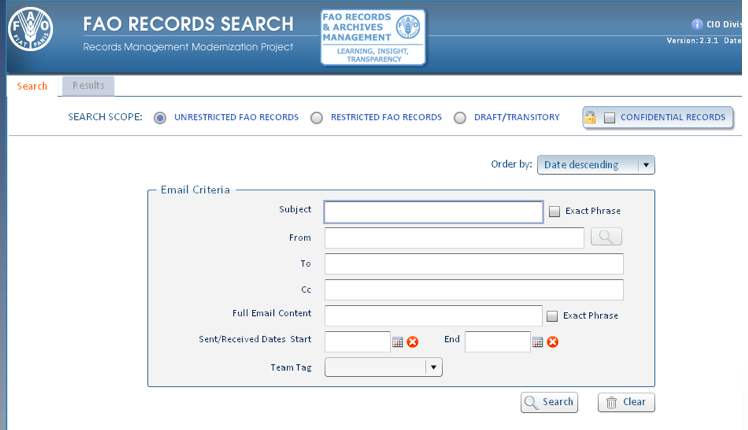
The search facility for the records system is built into the Outlook e-mail client.

To my eyes the search looks more intuitive than the advanced search in a typical electronic records management system.  This is because the metadata of e-mail (from/to/cc/subject/date) is simpler, more standardised and more intuitive than the metadata collected from end users in document profiles by electronic management systems.

This search allows people to specify a date range they are interested in, and to generate what is in effect a report of all the working e-mail sent/received by a particular individual or team within that date range (assuming they are in the appropriate permissions group)

Screen Shot 2013-07-07 at 23.43.25

Conclusions

There are six aspects to the FAO approach  that I find particularly valuable and interesting:

  • They haven’t tried to fight e-mail they have not tried to get users to move e-mail out of the e-mail environment and into an environment that works on a completely different logic (the logic of a folder structure/ fileplan hierarchy)
  • They have used the strengths of e-mail  – the fact that you can intuitively search and/or sort e-mail  by sender/date/recipient and title;  the fact that you have the context of who a document/messages was communicated to and when; the fact that colleagues spend most of their computer time in the e-mail environment; the fact that any document of any significance in environments such as the shared drive will pass through e-mail
  • They have mitigated the main weakness of e-mail  – the fact that trivial and personal messages sit cheek-by-jowl with work messages and make it problematic to provide access to the e-mail of colleagues
  • They have paid as much attention into making sure that the records  function as a useful information and news source for colleagues, as they have paid to making sure people contribute records to the system
  • Their approach does not depend on any particular proprietary software.  They have used a proprietary electronic records management system as their repository for the e-mail, but  they could have used any one of a number of different electronic records management systems and achieved similar results.  The customisation of the e-mail environment was done by their in-house development team.  Their approach does not depend on clever algorithms or sophisticated auto-classification rule engines.
  • They have moved away from files and filing,  but still group records into meaningful and manageable aggregations  Records are accumulating in manageable aggregations, but these aggregations are slightly different from files we have been used to in old paper filing systems, and the files that we created in  electronic document and records management systems.  Those files attempted to capture the whole story of each particular piece of work.   They depended on teams setting up a new file for every new piece of work that they started.   The nearest equivalent of the file in the FAO set up is the team tag.  But teams have not been required to create/request a new team tag every time they start a new piece of work – they keep the same team tag for all the work they undertake.  The record is in effect a correspondence record of that particular team over a particular time.  This is less granular than a traditional file structure.  But the loss of granularity is compensated for by the ability to sort on sender/recipient and date.

The mechanics of manage-in-place records management tools

The idea of a manage-in-place records management tool is that it holds your records classification scheme and retention rules, and applies them to content held in a variety of different content repositories/applications (SharePoint, line of business systems, e-mail archives etc.).

At the IRMS conference in Brighton in May I had conversations with several vendors of manage-in-place records management tools about how they went about ensuring that their products could connect with the applications in day-to-day use within organisations

The importance of APIs (application programming interfaces)

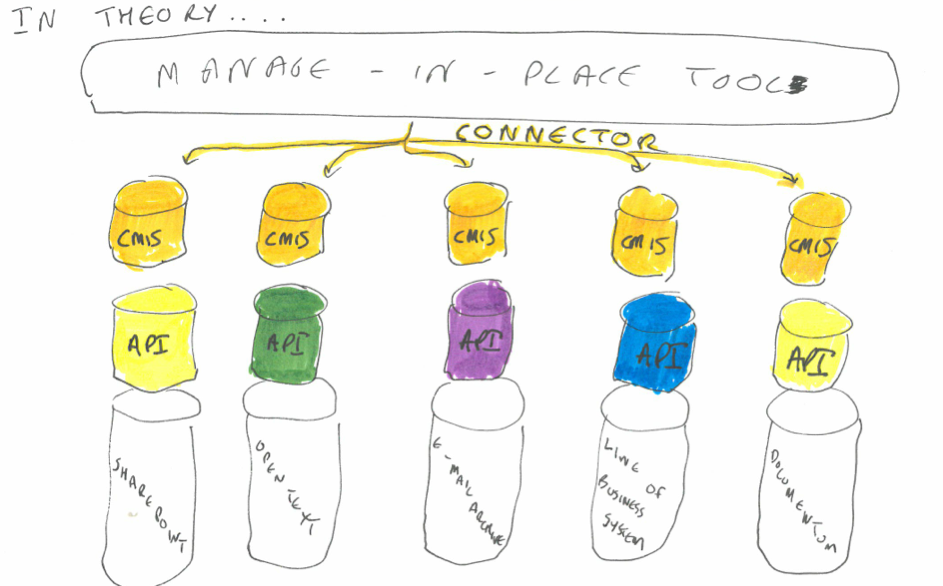
In order for the manage-in-place tool to work it needs to have a ‘connector’  to each content repository that it wishes to govern.

The connectors are typically built to use the API (application programming interface) of the content repository.  The API exposes a subset of the content repository’s functionality.   It specifies how any authorised external application (in this case  a manage-in-place tool) can issue commands to the content repository.

Some of the things that a records manager might want their manage-in-place tool to do inside the various content repositories of your organisation include:

  • adding metadata to a document or aggregation of documents
  • linking an aggregation of documents to a node in a records classification
  • preventing editing or deletion of  a document or aggregations of documents
  • linking a retention rule to a piece of content or an aggregation of content

The beauty of the concept of an API is that the two applications can interact with each other without you having to customise either application.  It does not matter if the two applications are written in entirely different programming languages.  Nor does it matter if one or both of the applications are based in the cloud.

In theory:

  • you could replace your manage-in-place tool with a new manage-in-place tool from a different vendor, and none of the content repositories need notice any difference (provided that the new manage-in-place tool carried on issuing the same commands to their API)
  • you could replace a content repository with a successor repository from a different vendor without the manage-in-place tool noticing any difference (provided that the new content repository offered a similar API that enabled them to make the same commands)

In practice each vendor constructs the API for their content repository differently, and this creates two challenges for the makers of manage-in-place tools

1) they have to construct a different connector for each different vendor’s content repository.  Two of the  manage-in-place providers I spoke to at the conference (RSD and IBM) both provided connectors to over 50 different commonly used content repositories.

2)  some APIs are better than others.  Some applications expose more functionality through their API than other applications, and hence let the manage-in-place tool do more things to their content.  One example cited was that the manage-in-place tool can get some document management systems to display the organisation’s records classification (fileplan), so that users of the document management system can link or drag and drop content to the appropriate node in the classification.  Other document management system do not have that functionality exposed in their API.

CMIS (Content management interoperability services)

CMIS  is a specification that aims to overcome the first of these two problems.  The specification was drawn up by a coalition of vendors in the ECM space under the auspices of the OASIS Technical committee.

The idea is that vendors  add a CMIS layer to their applications.  Just like an API, the CMIS layer exposes a subset of the functionality of the native application, so that an external application can make use of that functionality.  The difference is that whereas each vendor’s API is constructed and expressed in a different way, a CMIS layer is standardised. This means that a similar function (for example ‘add a document’) would be expressed in the same way in the CMIS layer of each vendor’s products.

A mange-in-place tool vendor could choose to build connectors to the CMIS layers of content repositories, rather than through the API.  In theory this saves a manage-in-place vendor from building seperate connectors for every different type of content repository they want their product to be able to govern.

Screen Shot 2013-06-25 at 11.18.49

In practice the vendors of the manage-in-place tools that I spoke to told me that they prefer to write connectors that use the API of each application, rather than the CMIS layer.   This is simply because most repositories expose more functionality through their API than through their CMIS layer.
Screen Shot 2013-06-25 at 11.14.02

CMIS and records management

The disadvantage of CMIS being writtten by vendors is that a coalition of vendors have to agree for functionality to be put into the specification. They have tried to capture concepts and functions that are common to all or most existing repositories. Functionality such as records management, which some repositories have and some don’t, has not received prominent treatment in CMIS.  The first version of CMIS had concepts such as a document, and a folder, but it did not support retention rules, nor a records classification/fileplan (although it did have the concept of a folder structure).

The latest version of CMIS (1.1) does have retention functionality in for the first time.  But that has not pleased all of the vendors.  Jeff Potts, of Alfresco wrote this in his blogpost announcing the approval of CMIS 1.1

This new feature allows you to set retention periods for a piece of content or place a legal hold on content through the CMIS 1.1 API. This is useful in compliance solutions like Records Management (RM). Honestly, I am not a big fan of this feature. It seems too specific to a particular domain (RM) and I think CMIS should be more general. If you are going to start adding RM features into the spec, why not add Web Content Management (WCM) features as well? And Digital Asset Management (DAM) and so on? I’m sure it is useful, I just don’t think it belongs in the spec.

This is the dilemma for CMIS:

  • if they do not give full coverage of sets of functionality such as records management then manage-in-place tools will bypass the layer and just use the  APIs of the content repositories.
  • the more detailed and precise their definition of records management functionality is, the harder it is to get the coalition of vendors to agree on it

From a records mangaement point of view what we want out of CMIS (or any other standard in the API space) is to set out a minimum set of records management functionality that the API of every business systems sbould have.

In theory, if CMIS specified a set of API commands that would expose the functionality needed by one or more of the current electronic records management specifications,  then vendors would never have to re-architect their product to meet that electronic records management specification,  All they would need to do is expose the relevant functionality  in their CMIS layers and let the manage-in-place tools use that functionality to govern the content they hold.

Of course this would not solve all of our problems –  one of the biggest content repositories in most organisations are simple shared network drives, that don’t have an API (never mind a CMIS layer!).

How long should an e-mail account be kept after a member of staff leaves?

On 30 May 2013 two postings appeared that between them shed light on how organisations are currently managing the archived e-mail accounts of staff who have left:

    • The first was a post by Rebecca Florence to the IRMS Records-Management-UK listserv that kicked off a debate on e-mail account retention and deletion
    • The second was a blogpost by Emma Harris of State Records New South Wales reporting the findings of a survey they had conducted into how public offices in NSW are managing their e-mail

Rebecca Florence posted a description of the situation in her organisation:

The current arrangement is that for a period of time post-leaving, access to the mailbox and email archive (in our case we use the Symantec Enterprise Vault) can be passed to a designated member of staff.

After that period of time has elapsed the mailbox/archive is deleted by IT, with the contents being exported to a separate restricted access area. Access is granted to the exported contents on a case by case basis. Currently the exported content is held indefinitely.

I should add that as you would imagine there are policies and guidance in place which advises staff to save emails where necessary outside Outlook for longer term retention and also assigning responsibility post-leaving allows for a review of any remaining emails for ongoing business use. I’m sure as most of you will have experienced, there is disparity across departments in regards to how well this is managed.

Phil Bradshaw replied that keeping records indefinitely is not the same as keeping records permanently:

  • keeping records permanently means we have assessed the records and found them to have enduring long term value
  • keeping records indefinitely means we cannot find a basis to set a retention rule on them

Is it possible to deal with e-mail by reviewing e-mail accounts when members of staff leave?

Lawrence Serewicz responded to Rebecca’s post by pointing out the legal costs and risks of maintaining all e-mail accounts indefinitely:

  • e-mail accounts generally contain personal data and the indefinite retention of entire e-mail accounts may  breach several of the EU data protection principles.
  • information held in an e-mail archive may be subject to discovery in the event of a legal case, and to disclosure in the event of an access to information request

Lawrence recommended that e-mail accounts get deleted three months after a member of staff leaves, but only after:

  • a pre-exit process in which the line manager and the employee go through the e-mail account together and decide how to deal with the mails OR
  • a post exit process (in cases where the pre-exit process was not carried out )- where the specific service the employee worked for, Legal, HR and internal audit would all review the account.  The specific service would look for e-mails the service needed to carry on with the employees work; Legal would look for e-mails needed for possible legal claims, contracts or agreements; HR would look for e-mails needed for possible grievance or disciplinary issues; Internal audit would look for any illegality

The approaches described by Rebecca and Lawrence are similar in two respects:

  • both approaches reflect a belief that colleagues can not be relied upon to comprehensively and routinely deal with individual e-mails as they go along by filing and deleting
  • both approaches  rely on a big effort just before or after  the member of staff leaves to deal with what is left in the e-mail account.  This is problematic.   All of our experience as records managers tells us that it is very hard to deal with backlogs.   E-mail communications are exchanged with such frequency that backlogs quickly scale up to a size that makes patient sifting and sorting impossible.  An e-mail account at the end of a person’s employment is in effect a filing backlog.

The only difference between the two approaches is that:

  • Rebecca’s organisation cannot guarantee that  the line manager /designated person of the departed staff member will review the e-mail content thoroughly, and move important mails to a more appropriate, more accessible place.  As a result they keep all the e-mail accounts as a back up, just in case there is an overriding need (legal or investigative) to find an e-mail from an ex member of staff.
  • Lawrence’s approach requires organisations to ‘feel the fear and do it anyway’.   There is still no guarantee that reviews have been carried out/carried out properly,  but this time the organisation presses the delete button after three months regardless.

Is it possible to deal with e-mail by asking staff to move important e-mails into an electronic or paper file as they go along?

Simon McCauley responded to Rebecca’s posting by saying that in his organisation  staff are expected to save important e-mails into the electronic document and records management system (Livelink) as they go along.

Simon’s organisation are planning to implement a policy of moving e-mails from people’s e-mail accounts to an e-mail archive six months after the date of the e-mail, then deleting them from the archive after a further twelve months.

I assume that the thinking behind such a policy is that:

  • they have confidence in the capacity of their colleagues to file important e-mails as they go along
  • they know that colleagues are much less likely to file as they go along if they  have the comfort of knowing that the e-mails are kept for them in their e-mail account anyway

The  State Records Authority of New South Wales (NSW) has given similar advice to NSW public offices.   They summarise their policy as follows:

State Records advises NSW public offices to capture email messages that are sent or received in the course of official business into a corporate recordkeeping system. State Records suggests two principle methods for capturing messages:

– capturing messages into an EDRMS (electronic document and records management system)

– printing messages and capturing them on paper files

In her blogpost reporting the findings of their  recent survey of  e-mail management in NSW public offices,   Emma Harris of State records reported that:

– 81% of public offices agreed with the statement that in their offices ‘e-mail messages with corporate value are stored only in personal email accounts and are therefore at risk of loss or premature destruction’

– 33% of respondents advised that employees in their organisation neither capture messages to an EDRMS nor print and file them.

– few organisations have investigated alternative approaches to managing e-mails’[as opposed to asking colleagues to move e-mails into EDRMS/print to file].

The blogpost went on to report:

– half of the responding organisations have implemented an archiving solution, with two products (Symantec Enterprise Vault and Quest Archives Manager) being the most commonly implemented.

– A number of email archiving solutions have retention and disposal functionality (e.g. the ability to set retention periods and disposal actions on messages and to destroy messages when retention periods have expired). However the results of the survey suggest that organisations with email archiving solutions are not actively managing the retention and disposal of messages using this functionality.

The findings betray a lack of confidence on the part of the NSW public offices in the adherence of their staff to the policy of moving e-mails to electronic or paper files. This lack of confidence is presumably what lays behind the fact that NSW are, like Rebecca’s organisation, keeping e-mail accounts indefinitely.

Can we still set a blanket retention rule on e-mail accounts if we know they contain important messages that we need as records?

There is a similarity between all four approaches – Lawrence’s, Rebecca’s, Simon’s and the New South Wales approach.  All four are based on moving e-mails out of e-mail accounts.

If, like Lawrence and Simon, we are confident that we can move important e-mails out of e-mail accounts, then setting a blanket retention period on those accounts not a problem.  We set a blanket retention period covering all accounts, and we make it as short as we possibly can to concentrate peoples minds

But what if, like Rebecca’s organisation, like New South Wales public offices, and like most of the organisations I have worked with and spoken to over the last decade, you are not confident that important e-mails are being moved out of e-mail accounts?   Then setting a retention period is a different type of exercise.  All of a sudden we are having to recognise that the e-mail account is a record – a record of the work correspondence of that member of staff.

A blanket retention period, however short or however long, is not appropriate for organisations whose e-mail accounts contain important correspondence that is not available elsewhere.   This is because the roles people play in organisations vary greatly in their significance and impact – you are unlikely to need a record of the correspondence of an accounts clerk in your finance department for the same length of time as the correspondence of your chief executive (with all due respect to both parties).

We need to find a rationale on which to base a retention rule on e-mail accounts.   This is something we as a profession have not hitherto thought through for the simple reason that we have been battling for over a decade to avoid having to treat e-mail accounts as records.  Even starting to think through the consequences of treating e-mail accounts as records feels like an admission of defeat.  In reality this is not an admission of defeat.  Defeat would come up if we gave up trying to keep manageable records of people’s work correspondence.

Getting people to move individual e-mails one-by-one to electronic files is a tactic not an end in itself.   Most organisations have not been able to make that tactic work – at the very least we need an alternative.

Establishing a defensible rationale for retention rules on e-mail accounts that we treat as records

We can set a retention period for a record of a particular type of work by considering all the different reasons why we need a record of the work in question, and then keeping  the record for the longest period that any of those needs is likely to stay valid.

The  e-mail account of an ex member of staff is simply a record of the correspondence exchanged by a particular individual in the course of their work, minus any e-mails that have been deleted/moved.

There are multiple legitimate reasons why someone might need to look at the work correspondence of a colleague or  predecessor who has left :

  • They might need to see what correspondence their colleague/predecessor had exchanged with a particular external stakeholder/partner/customer/supplier/citizen in order to inform their continuation of that relationship.
  • They might need to see what correspondence the colleague/predecessor had exchanged in the course of a piece of work because they need to continue with the piece of work. restart it,  learn from it, evaluate it, copy from it etc.
  • They might need to account for their colleague/predecessor’s work, in response to audit, investigation, criticism, access to information request or legal discovery
  • Depending on the nature of the role of that individual, they might need to transfer the correspondence to a historical archive on account of the enduring public interest in the work of that individual

In most parts of most organisations we cannot adequately meet those record keeping needs without retaining the e-mail account of the member of staff concerned.   The challenge of setting a retention value on e-mail accounts is that such accounts will typically contain corresondence arising from many different pieces of work, and  those pieces of work may have very different retention values.

A nice, neat approach is simply to keep the e-mails of an individual for as long as you keep the records of the main type of work that they carried out.

  • If they were an accounts clerk in a finance department, and your organisation’s retention rule on accounting work is to delete the records after seven years, then apply that rule to their e-mail account also
  • If they were a senior civil servant working on policy issues and on new legislation,  and your retention rule for work on the development of legislation, and on the development of national policy, states that records should be kept for  for 20 years and then reviewed for permanent preservation and transfer to a historical archives,  then apply that rule to  their  e-mail account also
  • If they worked on staff recruitment, and the retention rules for recruitment work is to delete records three years after the recruitment exercise,  then retain their e-mails for three years too.

One choice to make is whether to have the retention rule:

  • applied to the entire e-mail account – so the retention rule is triggered from the moment of the individual’s departure from the organisation (this has the disadvantage that some staff may have had long and varied careers in the organisation)
  • applied to e-mails by date (month or year)  –  so the retention rule is triggered by the end of the month or year that the e-mail was sent/received in (a better option)

The problem of personal data of a sensitive nature in e-mail accounts

So far so good – we have a defensible logic to base our  retention rules on e-mail accounts, to meet the full range of records management needs.  But there is a problem.  The problem is the widespread presence of personal data of a sensitive nature in e-mail accounts.  By ‘sensitive nature‘   I mean

  • information about the e-mail account holder that they would not want even their closest colleagues or their successor to access; and
  • information about a third party that the e-mail account holder corresponded with, or had discussed in e-mails, where that person could be disadvantaged if the information were to be made available even just to the account holder’s successor and closest colleagues

Even if an individual never used their work e-mail account for non-work correspondence with friends and family, their account is still likely to contain personal information of a sensitive nature, exchanged with colleagues.  Think of an e-mail exchange between a line manager and a member of their team who had to take time of work for personal or family reasons.

The fact that most e-mail accounts have not had such e-mails filtered out means that most organisations in my experience (centred around the UK and Europe) cannot currently allow colleagues routine access to the e-mail accounts of their predecessor, or their former colleagues.

Most organisations struggle to set access rules on e-mail accounts

Most electronic document management systems work on the principle that access permissions can be set for objects or aggregations of objects (file/folder/site/library/document etc.).   A person or group of people is either permitted or forbidden to access that object/aggregation.   There are no grey areas in between.  If I  am authorised to see a document then the system merely asks me to authenticate myself (so the system knows it is indeed me who is asking) .   It does not ask me why I want to see it.

Rebecca’s organisation allows access to archived e-mail on ‘a case-by case’ basis.  In other words they are unable to tell their e-mail archiving tool who is authorised  to access each e-mail account.

With e-mail archives the information contained in the archive is so sensitive that organisations are imposing an extra control – people are having to say why they need to access the e-mail account, and that request is either permitted or denied, not by the e-mail archive itself, but by people in the department responsible for overseeing the archive.

I worked with one organisation where any application to see e-mail accounts of former staff had to be approved by their human resources (HR) department, who would only allow consultation in exceptional circumstances where there was no other way of getting the information.   One  individual told me that any that they had wanted to access the correspondence that a former colleague had exchanged with a supplier about a particular contract, but HR had refused.

That HR department had no option but to be restrictive.  Imagine this scenario:  I work with a colleague, and  develop malicious intent, or an unhealthy curiosity, towards them.  They leave.  I think of a project that they worked on and say to the IT department that I need to look through their e-mail account to find records relating to that project.  What else might I look for/find?  That is why governance of e-mail archives is vital , including keeping non- deletable records of who searched for what terms under what authority , and what e-mails they opened and looked at.  This must include any searches made by any staff, whether end users or IT system administrators.

Is there any point in setting a retention rule that covers all the record keeping needs arising from an e-mail account if we cannot allow colleagues to access the e-mail accounts for those purposes?

The retention rule that we arrived at above was based on the full range of recordkeeping needs that we have in relation to the correspondence of an individual who is a close colleague or predecessor.  We now find that we cannot allow access to the e-mail accounts, even to close colleagues, for most of these purposes, because of the presence of personal information of a sensitive nature that is unmarked, unflagged, and undifferentiated from the rest of the mails in the e-mail account.

If we can only access e-mail accounts in response to overriding imperatives such as access to information requests, e-discovery requests and the need to defend or prosecute any legal case we might be involved in,   then should that be the only consideration we take into account in setting our retention rule? Should we only retain e-mail accounts for the period in which it is useful for us to have them in case of legal dispute?

If we only take into account the overriding imperatives of legal disputes and access to information requests then the logic for setting a retention rule becomes much more arbitrary:

  • if we adjudge the cost/risk of the e-mail accounts being subject to an access to information/e-discovery requests to be greater than the benefit of being able to use the e-mail accounts to support any case we would need to make in court,  then we would impose  a short retention period – perhaps the three months that Lawrence suggested
  • if we adjudge the benefit of being able to use the e-mail accounts of former members of staff to support any legal case we might want or need to make to be greater than the cost/risk of servicing access to information and e-discovery requests then we are likely to set a retention rule equivalent to a standard limitation period of seven years as Simon suggested (though you need to be careful with limitation periods – in some cases the clock of a limitation period may not start ticking until well after a member of staff leaves – for example if the person was working on designing a bridge, or a drug, or with children etc.)

The problem with this very pragmatic approach is that we will continue to fail to meet the day-to-day record keeping needs of our colleagues when they start a new job, and when they need to look back at the work of former colleagues.   And we will not not be able to make the record of the work correspondence of people playing important roles in society available to  future generations of policy makers, researchers and historians.

In his excellent Digital Preservation Coalition Technology Watch Report   on e-mail  Christopher Prom reported:

Winton Solberg, an eminent historian of American higher education, remarked … ‘historical research will be absolutely impossible in the future unless your profession finds a way to save email’ (Technology Watch Report 11-01: Preserving Email [PDF 916KB] by Christopher J Prom 2011,  page 5)

I will go one further and say that if we could solve the challenge of how we  provide an individual with routine access to the e-mail account of their predecessor, then we will be able to solve the challenge of how we provide access to that an e-mail account to historians or other researchers further down the line.  The two challenges are inextricably linked.

Many of our organisations have e-mail archiving tools, but these archives function as a murky sub-concious of the organisation, full of toxic secrets, inaccessible to the organisation in its normal day to day functioning,  and they pose a huge, ongoing,  information governance risk.

What we need is an approach to e-mail that results in staff leaving behind an e-mail account that their colleagues and successor can routinely access and use, without unduly harming either the account holder or people mentioned in their correspondence; and that we as an organisation can apply defensible access rules and retention rules to.

It is beyond the ability of a single organisation to develop such an approach (because it involves changes to available tools, changes to the way we think of an e-mail account, and changes to how we ask our colleagues to treat e-mail).  But it is well within the capability of the records management/archives professions to articulate such an approach, and then incentivise and cajole  venders (particularly the ecosystem around the big on-premise and cloud e-mail products/services) to create offerings that match it.

As a starting point I would like to see us as records managers and archivists getting this issue on the agenda of our organisations and of society more widely.

Two quick suggestions to get the ball rolling:

  • For records managers –  if you are concerned that important e-mails are not being moved out of e-mail accounts,  consider broaching the emotive subject of e-mail accounts when  building or revising your organisation’s records retention schedule.  Include in the retention schedule a list of those post holders in your organisation whose e-mail account contents you require be retained for a minimum of 20 years
  • For archivists working for the national archives of our nations -if you are concerned that important e-mails in government departments/ministries in your country are not being moved out of e-mail accounts,  then when you draw up or revise your selection policies,  include a list of posts in the various government bodies from which you require e-mail account contents to be appraised for permanent preservation in your archives
Why a link between MoReq2010 and the OAIS model would benefit both records managers and archivists

The dream of a single record keeping profession

It is roughly twenty years since Frank Upward began popularising the records continuum as a paradigm shift away from the previously prevalent records lifecycle model. It was the early 1990s, the digital revolution was about to hit organisations and Upward did not believe that a body of professional thought based on the lifecycle paradigm would cope with it.

Upward had both philosophical and practical concerns about the lifecycle model.

His philosophical concerns stemmed from the fact that the records lifecycle model depicted records as moving in a straight line through time: from creation of the record, through an active phase (where it is being added to and used); a non-active phase (where it is kept for administrative and/or other reasons); until final disposition (destruction, or transfer to an archive for long-term preservation). Upward pointed out that whereas Isaac Newton believed time moved in a straight line like an arrow, Einstein had proved that time and space were inseparable and that both were warped by the speed of light.

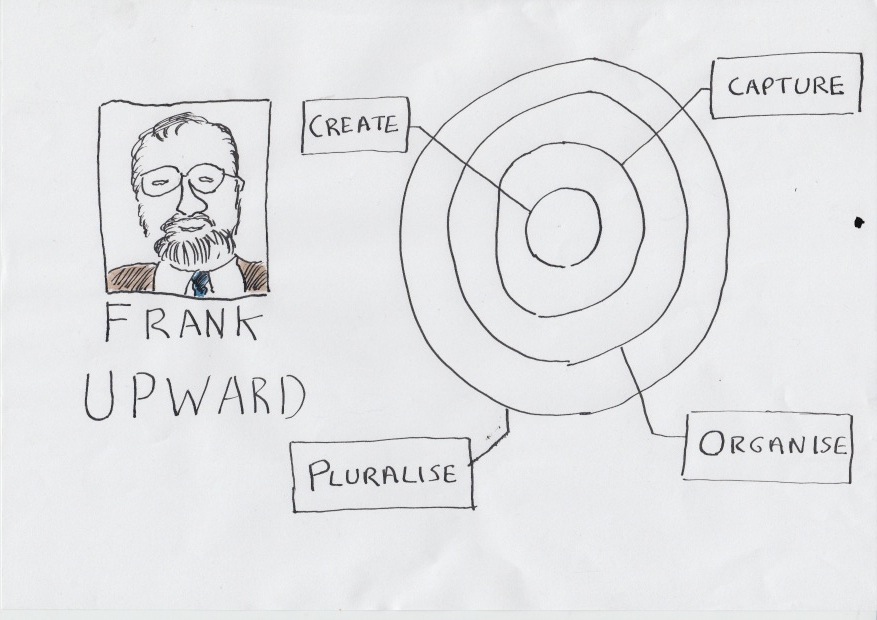
Upward compared records to light. Light carries information about an event through time and space. So do records. Upward based his records continuum diagram on a space-time diagram. The space time diagram depicts the way that light travels in every direction away from an event through space and through time. Noone can know about an event unless and until the light has reached them. The records continuum diagram showed that records need to be managed along several different dimensions in order to function as evidence of that event across time and space, and in order to reach different audiences interested in that event for different reasons, at different times and in different places.

Sketch of Frank Upward next to a drawing of the continuum model

Upward’s practical concern related to the fact that the lifecycle model had been used to underpin a distinction between the role of the records manager and of the archivist. The records manager looked after records whilst they were needed administratively by a creating organisation, the archivist looked after records once they were no longer needed administratively  but still retained value to wider society.

The interest of wider society in the records of any particular event do not suddenly materialise 20 or 30 years after an event. The interest of society is present before the event even happens. A records system of some sort needs to be in place before the event happens in order for the participants/observers of the event to be able to capture a record of it. That system needs to take into account the interest of wider society in the event in order for the records to have a fighting chance of reaching interesting parties from wider society if and when they have the right to access them. This concern is particularly pertinent to digital records. Whereas paper records could left in benign neglect, digital records are at risk of loss if they, and the applications that they are held within, are not actively maintained.

Upward didn’t use the word archivist or the word records manager. To him we are all record keepers. What we do is records keeping, and we belong to the record keeping profession.

One of the big impacts of the digital revolution, and of the paradigm shift from the lifecycle model, was the shift of attention away from the form and content of records themselves, and towards the configuration of records systems. In this post I will compare the way records managers have gone about the business of specifying records systems with the way archivists have gone about defining digital archives.

The continuing divide between records managers and archivists

Upward’s plea for a united recordkeeping profession has gone largely unheeded in the English speaking world. Twenty years into the digital age we still see a profound cleavage between not just the roles of archivists and records managers inside organisations, but also their ambitions and strategies with regard to electronic records.

The DLM forum is a European group that brings together archivists (mainly from the various national archives around Europe) and records managers. When you are listening to a talk at a DLM event you can always tell the records managers and the archivists apart:
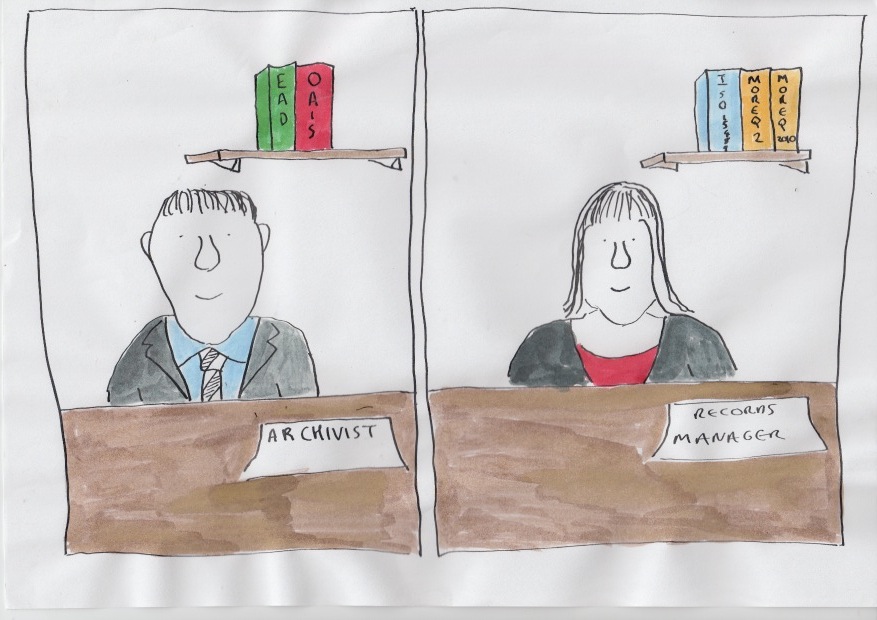
  • The records managers refer to MoReq2010 (developed by the DLM Forum itself ) –  a specification  of the functionality that an application needs in order to manage the records it holds
  • The archivists talk about OAIS (open archival information information systems) a standard for ensuring that a digital repository can ingest, preserve, and provide renditions of electronic records that have been transferred to the archive
This reflects a difference in the initiatives that the two branches of the profession have adopted towards electronic records

Records management initiatives

The records management profession have attempted to design records management functionality into the systems used by the end-users who create and capture records. Over the period 2000 to around 2008 this strategy was mainly centred around specifying and implementing large scale corporate wide electronic document and records management systems (EDRMS) Unfortunately a relatively small percentage of organisations succeeded in deploying such systems, and even those that did still found that many records were kept in other business applications and never found their way into the EDRMS.

We are now in the early days of the development of alternative records management models. MoReq2010 is the most recent attempt to influence the market and specify the functionality of electronic records management systems. MoReq2010 is framed to support several different models. It continues to support the EDRM model, but it also supports the following alternative models:
  • building in records management functionality into business applications (and storing records in those applications) (in-place records management)
  • storing records in the business applications into which they were first captured, but managing and governing them from a central place (federated records management)
  • integrating the many and various business applications in the organisation into a central repository which stores, manages and governs records.
The key thing that all three of these newer approaches have in common is that they each involve records passing from one system to another during their lifetime. For example in the in-place model even if an organisation suceeded in installing records management functionality into every one of their applications (a distant hope!), it would still need to make provision for what would happen to the records held by an application that it wished to replace. For that reason MoReq2010 pays particular attention to ensuring that applications can export records with their metadata in a way that other applications can understand and use.

Archival initiatives

The strategy of archivists has been to design digital archiving systems which can capture records from whichever system(s) a record creating organisation deploys. In theory it would not matter what applications an organisation (government department/agency etc.) used to conduct their business, and it would not matter whether or not that application had records management functionality. The archives would still be able to accession records from them provided that they succeed in:
  • building a digital archive that can receive accessions of electronic records and their associated metadata
  • defining a standard export schema/metadata schema dictacting exactly how what metadata needs to be provided, and in what form, about records transfered to the archives
  • enforcing that export schema/metadata schema so that all new transfers of electronic records come in a standard form that is relatively straightforward for the archive to accession into their digital repository
Unfortunately only a small number of national archives have succeeded in making electronic accessions of records into anything remotely resembling a routine. Some archives have succeeded in building digital archive repositories, The UK National Archives has got one, so has Denmark, the US, Japan and others. But the process of accepting transfers of electronic records into these archives is problematic. Every different vendor sets up their document management systems to keep metadata about the content their applications hold in a different way. The first time the archives accepts a deposit of records from each different system there is a lot of work to do translating the metadata output from that system to a format acceptable to the digital archive repository. The resources required to do this work either has to be provided by the Archives, or by the contributing body.

Jon Garde summed the situation up when he said in a talk to the May 2012 DLM Forum members’ meeting that ‘most records never leave their system of origin’ This comment serves as a sorry testament to the success of the initiatives undertaken by both sides of our profession hitherto.

Jon Garde

Lack of a join between records management and archival initiatives

It is rare to see examples of a joined up strategy between records management and archival initiatives. In the United Kingdom the National Archives (then the Pubic Record Office) started out in the early years of the digital age by taking a great interest in the way government departments managed their electronic records, in the hope that this would make it easier for the Archives to accept electronic records from those departments. The records management arm of TNA defined the UK’s electronic records management system specification. Between 2002 and around 2008 they supported government departments in implementing the EDRM systems that complied with those specifications. But the archivists at TNA derived little benefit from this.

The TNA issued both versions of its electronic records management specification without a metadata standard and without an xml export schema. This meant that each compliant EDRM system from each different vendor kept metadata about records in a different way, and hence the transfer of records from those EDRM systems to the National Archives would need to be thought through afresh for each product. By the time the National Archives did get round to issuing a metadata standard they had already made the decision to stop testing and certifying systems (in favour of the Europe-wide MoReq standard). The abscence of a testing regime meant that vendors had no incentive to implement it into their products. But even if vendors had implemented their metadata standard, the TNA would have benefited little from it on the archive side. This is because TNA decided not to use that metadata standard for their own digital archive repository.

The OAIS model

The OAIS model is a conceptual model of what attributes a digital archive system should possess. It makes clear one of the key differences between a traditional archive of hard copy/analogue objects, and the digital archive.

A hard copy archive, in the main, produces to the requestor the very same object that they have been storing in the archive, which in turn is the very same object that was transferred to the archive by the depositing organisation.

In a digital archive this does not hold true. The object originally transferred to the archive may need to be changed or migrated to new software or hardware, so the digital object actually stored in the archive will differ from the digital object originally submitted to it . At the point in time when a requestor asks to see the record the digital archive will usually make a presentation copy for them to view, rather than providing them with the object that they store in the repository. The object that they provide to the requestor may differ in some respects from the object stored in the archive, for example if the archive wishes to present a version of the object that is better adapted to the browser/software/hardware available to the requestor.

The OAIS model came up with a vocabulary to describe these three seperate versions of the record:
  • The object originally transferred to the archive is a submission information package (SIP)
  • The object stored in the archive is an archival information package (AIP)
  • the object provided to the requestor is a dissemination information package (DIP)
OAIS has no certification regime, so there is no way for proprietary products, open source products or actual implementations to be certified as compliant with the model. At various times the archives/digital preservation community has debated whether or not it should have a certification regime (see this report of an OAIS workshop run by the Digital Preservation Coalition). Some archivists have felt that it is is an advantage that OAIS does not have a certification regime, because it allows vendors and organisations the flexibility to implement the model in different ways. Others have felt that the lack of a certification regime hinders interoperability between archives.

An example of the OAIS model way working well – The Danish National Archives

I had a tour of the Danish National Archives on 31 May 20102 (the first day of the members meeting of the DLM Forum). The Danish National Archives has a very well functioning process based on the OAIS model. They have laid down a clear standard for the format in which Danish government bodies transfer records plus their metadata (submission information packages) to the Archives. Government bodies send records on optical disk or hard drives. The archives gives each accession a unique reference. Then it tests the accession to ensure it conforms to the standard. The testing is performed on a stand alone testing computer. Each accession is called ‘a database’, because the accession always comes in the form of a relational database.  Such relational databases typically hold metadata together with the documents/content that the metadata refers to.

I asked whether a government department could deposit a shared drive with the archive. They replied that the department would have to import the shared drive into a relational database first in order to format the metadata needed for the accession. This brought home to me the fact that when an archive imposes a standard import model it does not reduce the cost of transferring records from many and various different systems used by organisations to one digital archive. It merely places a greater proportion of the cost of the migration on the shoulders of the transferring bodies.

It is not necessarily easy for other national archives to replicate the success of the Danish National Archives. An archivist from the Republic of Ireland accompanied me on my tour of the Danish National Archive. He is in charge of electronic records at the archives of the Republic of Ireland. The Irish archives have not been able to get a standard format agreed for government departments to send accessions of electronic records to them. From time to time government bodies send accessions of electronic records, principally when a government body is wound down. The archives can do nothing more than store the accessions on servers and make duplicate copies. They have no digital archive repository to import them into. Even if they did have an archive repository the fact that the accessions are in such different formats means that the process of ingesting the accessions into such a repository would be an extremely time consuming and lossy process. The chances of the archives persuading the rest of the Irish government to accept a standard format and process for transferring electronic records are slim because in times of austerity it would be seen as an extra administrative burden.
(For more details on the approach of the Danish National Archive  watch this 25 minute  presentation  by Jan Dalsten Sorensen)

An example of the records management approach working well – the European Commission

The European Commission  has taken a records management approach to managing records from their creation until their disposal or permanent preservation.

They started off with a fairly standard electronic document and records management system (EDRMS) implementation with a corporate file plan, and later with linked retention rules. But then they expanded on this model.  They are currently in the process of integrating one-by-one their line-of-business document management systems into the EDRM repository. The ultimate aim is that a member of staff could choose to upload a record into anyone of the Commission’s document management tools and still have the record captured in a file governed by the Commisssion’s filing plan and retention rules. They are also developing a preservation model for the historical archives. This module will enable records to pass from control of the Directorates-General (DG) of the Commission that created them, into the control of the Historical Archives without leaving the EDRM repository itself.

The model is not perfect (like every other organisation they find it difficult to persuade colleagues to contribute e-mail to the EDRMS), and it is not finished (not all the different document management systems have been integrated yet, not all the functionality needed to manage the process of sending records to the control of the Historical Archives has been added yet), but it is a very well thought through and solid approach, that has successfully scaled up to cover nearly 30,000 people.

As with the Danish National Archives, it would not be easy for other organisations to replicate the success of the European Commsision’s approach.The Commission’s success has come as a result of a records management programme that was started in 2002, it has taken a considerable amount of time (ten years) and a considerable amount of political will to draft the policies, build the filing plan, draft the retention schedule, establish the EDRM, and to commence the integration of other document management systems into the EDRM. The integration of each document management system into the EDRM is a new project each time, requiring developers to work on the document management system in question in order that it can use the EDRM systems object model to deposit records into the respository.

In these turbulent times of economic austerity it is hard to envisage many organisations embarking on a records management programme that would take 6 to 8 years to deliver benefits.

How do we make it more feasible to manage records over their whole lifecycle?

The facts that these two excellent examples, from the Danish National Archives and the European Commisson are so difficult to replicate is a concern for both the records management and archives professions.

In an ideal world every records management service would operate a records repository, every archive would run a digital archive. In an ideal world the records managers would not need to get developers to do any coding to enable business applications to export their records into the records repository – the applications would be configured so that they could export records and all accompanying metadata in a way that the repository understood.
In an ideal world an Archive running a digital archive would not have to specify to their contributing bodies that they need to tailor and adjust the exports of their application. In an ideal world those bodies could run a standard export from any of its applications, that the Archive could import, understand and use.

The key enabler for both of these things is a widely accepted standard on the way metadata on things like users, groups, permissions, roles, identifiers, retention rules, containers and classifications are kept within applications, coupled with a standard export schema for the export of such metadata. If such a standard schema existed then a records repository owner or digital archive owner could specify to the owners of applications that needed to contribute records to the repository/digital archive that they either:
  • 
implement applications that keep and records and associated metadata in that standard format, OR
  • 
 implement applications that can export metadata in the standard export format , even if the metadata within the application had been kept in a different way
  • develop the capability to transform exports from any of their applications into the standard export schema. This last point should be helped by the fact that any widely accepted export schema would lead to the growth of  an ecosystem of suppliers with expertise in converting exports of records and metadata into that format.  Indeed such a format could become a ‘lingua franca’ between different applications.

The opportunity for a link between MoReq2010 and the OAIS model

The only candidate for such a standard export format at the moment is the MoReq2010 export format, published by the DLM Forum. The DLM forum comprises both archivists and records managers, but most of the archivists have hitherto taken relatively little interest in MoReq2010.  On June 1 this year (the day after our visit to the Danish National Archives) I gave a presentation to the DLM members forum meeting suggesting that the archival community should develop an extension model for MoReq2010, such that any system compliant with that module would also have the functionality necessary to operate in accordance with the OAIS model.

This would have a number of beneficial effects. For the first time in the digital age we would have a co-ordinated specification of the functionality required to manage records at all stages of their lifecycle including managing archival records.

It would also be a huge boost for MoReq2010. The first two products to be tested against MoReq2010 will be SharePoint plug-ins – one produced by GimmalSoft, one by Automated intelligence. Let us assume that both products pass and are certified as compliant. Both products will be able to manage records within the SharePoint implementation that they are linked to. Both will be able to export records in a MoReq2010 compliant format. But there still won’t exist in the world a system capable of routinely importing the records that they produce. This is because the import features of the MoReq2010 specification are not part of the compulsory core modules of MoReq2010 – instead they are shortly to be published as a voluntary extension module.

Let us imagine that a National Archive somewhere in the world deploys a digital archive, that complies with the OAIS model, and that can import records exported from any MoReq2010 compliant system.  All of a sudden there is a real incentive for that archive to influence the organisations that supply records to it to deploy MoReq compliant applications  (or applications that can export in the MoReq2010 export schema, or MoReq2010 compliant records repositories).  It works the other way around too.  Let us imagine there is a country somewhere whose various government departments deploy MoReq2010 compliant applications.  All of a sudden there is an incentive for their National Archives to deploy a digital archive that is compliant with the import module of MoReq2010 and can therefore routinely import records and metadata exported from those MoReq2010 compliant applications.

Debate at the DLM members forum on an OAIS compliant extension module for MoReq2010

The suggestion of an OAIS compliant extension module for MoReq2010 sparked off an interesting debate at the May DLM forum members meeting. Tim Callister from The National  Archives (TNA) in the UK. and Lucia Stefan,  both criticised that OAIS model. They said it was designed for the needs of a very specialised sector (the space industry, with their unique formats and data types) and was not tailored for the needs of national archives who are largely tasked with importing documents in a small range of very well understood file formats (.doc, .pdf etc.). Jan Dalsten Sorensen from the Danish National Archives defended OASIS, saying that it had given archivists a common language and common set of concepts with which to design and discuss digital archives.

I said that any digital archives extension module for MoReq2010 should be compatible with OAIS – if only because otherwise  it would lose those archives (like the Danish National Archives) who had invested in that model. It would also lose the connection with all the thinking and writing about digital archives that has utilised the concepts of the OAIS model

After the debate I spoke to an archivist from the Estonian national archive. He said that his archive didn’t want lots of metadata with the records that they accession. I said that was because the more metadata fields that they specified in their transfer format the greater the amount of work that either they or the contributing government department would have to do to get the metadata into the format needed for accessions. If their contributing government departments had systems that could export MoReq2010 compliant metadata, and if the digital archive could import from the MoReq2010 export schema,  then they wouldn’t need to be pick and choose the metadata – they could take the lot.

Information assurance and encryption

Alison Gibney spoke to the June meeting of the IRMS London Group about the relationship between the disciplines of information assurance and records management.

Alison differentiated  information assurance from information security.  Information security covers any type of information an organisation wants to protect, whereas information assurance is focused on protecting personal data.    There is no US equivalent term, partly because the US legislation on personal data is less strict than that of the UK.

Alison said that in the UK public sector over the last five years records management has gone down a peg or two (thanks to budget cuts) , whilst  ‘information assurance’ has gone up a few pegs.  The rise of information assurance is thanks to the various high profile central government data leaks in 2007 and 2008; the Hannigan report which compelled UK government bodies to adopt a strong information assurance regime in response to those leaks; and the fines meted out by the Information Commissioner for non-compliance with the Data Protection Act.

Alison showed a list of the fines meted out by the Information Commissioner over the past few years.  She pointed out that a significant proportion of the fines had gone to local authorities.  This was not necessarily because local authorities are worse at managing personal data than, say, a private sector retail company.  It is more likely to be because local authority have literally hundreds of different functions that necessitate the collection, storing and sharing of personal data, whereas a retail operation may only have three or four such functions.  It is very hard for a local authority to ensure that all these many different functions are fully compliant with data protection legislation.

Alison also pointed out that most of the fines could be ascribed to two generic types of breaches:

  • communications being sent to the wrong person
  • loss or theft of removable media

These two types of generic breaches both occurred across a range of formats, digital and hard copy.   Communication misdirections included misdirected e-mail, letters and faxes.  Loss and thefts of removable media included losses of laptops, key drives and hard copy files.

When to encrypt and when not to encrypt

Alison said that encryption offered a solution to the problem of protecting personal data in certain circumstances.
Alison recommended encrypting:

  • personal data in transit (for example data being e-mailed to a third party) because of the risk of interception or misdirection
  • personal data on removable media (optical disks, laptops, mobile phones etc) because of the risks of loss or  theft

Alison did not recommend encrypting ‘data at the rest’ in the organisation’s databases/document management systems.   But she raised a question mark over data in the cloud.  Technically it is data at rest.  But it is data held by another organisation, possibly within a different legal jurisdiction, and the organisation may wish to encrypt because of that.

It is worth taking a closer look at the issues around the encryption of the different types of data that Alison mentioned.

Encrypting data in transit – e-mail

There are various ways of encrypting e-mail.   A typical work e-mail travels from a device, through an e-mail server within the organisation, to an e-mail server in the recipient’s organsiation, to the device of the recipient.  There are security vulnerables at any of those points.  Devices bring in a particular vulnerability particularly since the rise in usage of smartphones and of trends such as ‘bring your own device’.

The most secure option is for the message to be encrypted all along the chain.   However the further along the chain the e-mail is encrypted the more complex, expensive and intrusive the encryption software and the procedures for applying it become.   Chapter 4 of this pdf hosted by Symantec gives a neat summary of the different options for e-mail encryption.

If you decide to encrypt messages from the moment they leave the sender’s device  all the way to the recipient’s device (endpoint to endpoint) then both the sender and the recipient will need encryption software installed on their device.  This is intrusive for both parties.  It may be reasonable to expect organisations that you regularly exchange sensitive data with to have such software installed.  It would not  be reasonable for a local authority corresponding with a citizen for the first time to expect the citizen to install such software.

A less intrusive option  is ‘gateway to gateway’ encryption.  The  message goes in plaintext from the sender’s device to a gateway server inside their organisation. The gateway server encrypts it.  When it reaches the recipient organisation it is decrypted by a gateway server which sends it on in plaintext to the recipient.  Note that this model requires the recipient organisation to have the same encryption software installed on their gateway server as is used by the sending organisation.

A lighter approach to encryption is the gateway-to-web approach where a standard plaintext e-mail is sent to a recipient giving them a link to a web address where they can go to retrieve the message which is protected by some kind of transport layer encryption such as SSL (Secure sockets layer – as used to  protect credit card transactions on the web).  The web site will ask the user for authentication.  Assuming that the authentication details have been sent to the user by a different channel other than e-mail, this will provide some protection against an e-mail being sent to the wrong recipient.  In her talk Alison had informed us that 17 London boroughs had chosen encryption software from one particular vendor (Egress) – that uses this gateway- to-web model.  Although this is a lower level of security than endpoint to endpoint encryption, it has the crucial advantage that the recipient does not need to install encryption software.

Encrypting data on removable media

Encrypting personal data on removable devices is the most straightforward of the cases that Alison mentioned.  The individual who owns the device it with their (public) encryption key.  Only they have the (private) encryption key necessary to decrypt it.  If the device gets lost or stolen the data is safe so long as the person who gets it does not get the decryption key.

Encryption and data-at-rest

Bruce Schneier points out in his post Data at Rest vs Data in Motion (http://www.schneier.com/blog/archives/2010/06/data_at_rest_vs.html) that cryptography was developed to protect data-in-motion (military communications), not data-at-rest.   If an organisation encrypts the data it holds on its on-premise systems then it faces the challenge of maintaining through time the encryption keys necessary to decrypt the data. Schneier puts it succintly:  ‘Any encryption keys must exist as long as the encrypted data exists. And storing those keys becomes as important as storing the unencrypted data was’ .  If you are encrypting the data to guard against an unauthorised person overcoming the system’s security model and gaining access to the data, then logically you cannot store the decryption keys within the system itself (if you did you would not have guarded against that risk!).

Encryption and data in the cloud

Most organisations have regarded data at rest within their on-premise information systems as being significantly less at risk than data on removable devices and data in transit, and therefore do not encrypt it.

But what about data in the cloud? There are certain features of cloud storage that may lead your organisation to wish to encrypt its data.  You may be concerned that a change of ownership or a change of management at your cloud provider might adversely impact on security.  You might be worried that the government of a territory in which the information is held may attempt to view the data.  You may be concerned about the employees of the cloud provider seeing the data.  However fundamentally speaking, data in the cloud is data-at-rest.  It is data that is being stored not communicated.  .  If you encrypt your cloud data you have the same problem as you would have if you encrypted data on your on-premise systems – how do you ensure that you maintain the encryption keys over time, and where do you store them?  If your reason for encrypting is a lack of trust of the cloud provider then storing the decryption keys with the cloud provider would defeat the object.

The challenge of encryption key management

Key management is crucial to any encryption model. In theory you want the organisation to give every individual a private/public encryption key pair. That means that not only can individuals encrypt information (with their public key) that they wish to keep secret.  But you also can provide a digital signature capability because they can encrypt with their private key a signature that anyone can read with that individual’s public key.  This offers proof that the individual alone must have signed it because it could only have been encrypted with the individual’s private key.  Thus the signature is in theory non-repudiatable (the indivdual could not deny that it was they that sent it).

There are a couple of interesting issues around key management.  Do you make it so that only the individual knows their private key? – in which case the digital signature is genuinely non-repudiatable.  But if the individual loses their private key then they lose access to their signature and to information that they have encrypted.  The alternative is that the organisation provides a way for the individual to recover their private key, for example through an administrator.  But this means that the digital signature is in theory now repudiatable because the administrator could have used it to sign a message.

I am currently reading a wonderful book that explains why even two decades into the digital age there is still no widely accepted digital signature capability – the vast majority of organisations do not use digital signatures (and hence still have a need to keep some paper records of traditional blue ink signatures) The book is called burdens of proof and is written by Jean-Francois Blanchette.

Forthcoming extension and plug-in modules to MoReq2010

A unique feature of MoReq2010 when compared to previous electronic records management specifications is the provision for the DLM Forum to publish optional extension modules and plug-ins to extend the compulsory core modules of the specification.

This will enable the specification to embrace needs specific to some but not all organisations/sectors, without imposing costs on vendors who intend to develop products that do not service those organisations/sectors.

It will also enable the specification to develop over time to respond to new needs created by the ever-evolving world of applications used in business.

Yesterday afternoon at the DLM Forum members meeting in Copenhagen I heard Jon Garde announce a list of MoReq2010 extension modules and plug-in modules that would be developed over the coming 12 months.

None of these extension/plug-in  module will be compulsory.  Vendors will continue to be able to achieve MoReq2010 compliance with a product that does not meet any of them.  However vendors will be able to ask for their product to be tested against them.

Extension modules

Extension modules provide an extension to the core modules of the specification, but do not replace the core modules.  Below I have listed the extension modules that are due to be published in the next 12 months

Transformed records extension module

This  module will define a capability for a MoReq2010 compliant system to manage records that have been annotated and/or redacted.  The special issue around these relate to the fact that the system needs to manage the relationship between the unannotated/unredacted version of the document, and the annotated/redacted version(s).

File aggregations extension module

The core modules of Moreq2010 replaced the concept of a ‘file’ (which had been present in all previous ERM specifications)  with a much more flexible concept of an ‘aggregation’.  The concept of an aggregation refers simply to the containers that users use to organise their records. That could be anything from a folder structure to a SharePoint document library to an e-mail inbox.  The concept of an aggregation was made as flexible as possible in order to offer the vendors of products as diverse as e-mail clients, collaborative systems, wikis etc the possibility to secure MoReq2010 compliance.

However there may be some organisations who simply want a system that works like a traditional EDRMS, with a hierarchical classification, and with users restricted to creating files that can have sub-files and/or volumes and into which they can place documents.

The file aggregation module will define the capability for a system to hold aggregations called ‘files’ that can contain sub-files but cannot sprawl into multi-level folder structures.  This will also give backward compatibility to the predecessor MoReq2 specification.

Import services extension module

The import services module will define  the capability for a MoReq2010 compliant system to import data exported from any other MoReq2010 compliant system.  Of all the extension modules Jon mentioned, this is the most important to my mind.

The whole point of MoReq2010 is the idea that most records need to be migrated from one system to another at some point in their lifecycle, and hence every MoReq2010 compliant system must be able to export its records in the format specified by the export services module of MoReq2010, which is a core and compulsory module.

I predict that MoReq2010 will come to life if and when a vendor brings to market a product that complies with the optional import services extension module that is in the course of development.  Any organisation that deploys such a system as a records repository has a huge incentive to make its other applications MoReq2010 compliant.  It would know that the minute it wanted to replace such an application it could export all the content and import it into its records repository without a complex custom migration process.

Security categorisation services extension module

This will define a capability for a MoReq2010 compliant records system to implement security classifications in MoReq2010 such as secret, top secret etc.

Physical management services extension module

This will define a capability for a MoReq2010 compliant records system to manage physical objects (such as hard copy records)

E-mail client integration extension module

This will define a capability for a MoReq2010 compliant records system to integrate with an e-mail client such as Microsoft Outlook in order to capture e-mail as records into the system.

Plug-in modules

Plug-in modules for e-mail and for Microsoft Office documents

The function of plug-in modules within the MoReq2010 specifications are to provide alternative ways of implementing a particular type of functionality.

For instance a MoReq2010 system keeps content (for example electronic documents) in the form of components, that are managed as records.  The core modules of the specification contain a rather generic ‘electronic component’. Over the next 12 months two new plug-in modules will be written: one for e-mail and one for Microsoft Office documents.  These plug in modules will define the requirements necessary to capture and manage metadata specific to e-mail and Microsoft Office documents.

These formats have been chosen simply because they are in wide usage.  It is still possible to bring other formats into a MoReq2010 compliant systems – they will can  be brought in using the more generic electronic component.  More plug-in modules will be written in future years.

Jon anticipates that there will be a new version of MoReq2010 published annually to include all the new extension and plug-in modules

The nature of electronic records – podcast with Ben Plouviez

Between 2004 and 2006 Ben Plouviez (@benplouviez) oversaw the roll out of an EDRM (electronic documents and records management) system across what was then the Scottish Executive (but is now the Scottish Government).

Six years later and the system contains 14 million documents and is used by around 4,000 staff.

In this podcast Ben reflects even-handedly on both the benefits that having an organisation wide records repository has brought to the Scottish Government, and on the promises that the system has not fulfilled.

The roll out of the EDRM was driven partly by the Scottish Executive’s desire to breakdown silos between the various different parts of the administration. They  made the decision that wherever possible files would be open and accessible to the whole of the Scottish Government. There have been times when colleagues have found documentation that they would never have known existed were it not for the EDRMS.

The EDRM’s Scottish Government wide business classification scheme has not been an unqualified success, but nor could it be called a failure.  It is not terribly popular with users, who rarely use it to navigate to material that they wish to find.  However on the plus side the scheme has provided a stable and enduring  structure for the system.

Ben has found that the electronic files on the EDRM system do not tell a narrative in anything like as clear or as useable way as a typical paper file used to do.  Ben questioned whether it was feasible  for records managers to expect their organisations to keep a full electronic file of every piece of work they carry out.  Ben said that the concept of the file is predicated on the concept of the document and we are now seeing alternatives to the document in the form of blogs, wikis, discussion forums, etc.  None of these new formats fit naturally into the file.  I found it significant that MoReq2010 specification used the word ‘aggregation’ instead of the word ‘file’.  This implies that in the electronic world there are many different ways in which business communications can be collected (e-mails in in-boxes, tweets in tweet streams, etc..).

There have been some unexpected benefits to having an organisation-wide records repository.  For example Scottish Government have taken information from the system’s audit logs about who has read what on the EDRM and translated it into rdf triples (the non-proprietary format that underpins linked data and the semantic web).  They have then provided an interface to enable colleagues to query this data to find out what their colleagues have read on the system. This enables the serendipitous finding of documents of curerent interest, and provides a more human way of browsing and interrogating the system than that provided by either the business classification or by the search facility.  The Scottish Government have also used the same technique in relation to e-mail logs.  They have taken the records of who sent an e-mail to who and when, converted it to rdf, and provided a query and visualisation interface.  This means colleagues can find out who has been corresponding with particular colleagues or stakeholders.    Note that the content of the e-mail is not accessible, and that only e-mails with at least one person in cc have been included to ensure that private correspendence between two people is excluded.

Ben talked about the plans for the future of electronic records management in Scottish Government, including their intention to replace their existing EDRM within the next three or four years.  He speculated on whether it would be possible for one product/system to fulfill both their collabortion and records management needs, or whether Scottish Government would have to implement several different tools to deliver that vision.

This podcast is published as ECM Talk episode 014 – you can download it from here

G-cloud update

This Thursday I went to the tea cloud camp meeting on cloud computing held at the National Audit Office in London for an update on progress with the UK Government’s G-Cloud

Launch of Cloud Store

We heard that the UK Government’s CloudStore  could go online as early as this weekend.

CloudStore will be in effect a catalogue of suppliers who have been accredited by the UK government to provide the government with cloud services.  The accredited companies are grouped under four headings – Infrastructure as a service, Platform as a service, Software as a service (including applications such as EDRM, CRM and collaboration) and Services (including systems integrators).

This is a technology shift towards cloud solutions,   but more importantly this is a procurement revolution. It is a move towards transparent pricing, with suppliers stating their prices up front on the CloudStore, and pay as you go, easy- to enter and easy-to-leave contracts.

One IT manager told us that in her career as a civil servant she had managed so many contracts with poor suppliers (she used a stronger term than poor!).  Even though the contractors were not performing her department had no choice but to keep them because they had no plan B.  The penalty clauses for leaving the contract early were so great as to make it uneconomical to change, and the length of the procurement process meant that their were no alternatives lined up ready and waiting to step in and fill the gap left by the ousted supplier. For her CloudStore means always having a plan B.   If she has a poor supplier in future she looks at the cloud store, finds an alternative, terminates the contract with the poor supplier and starts one with an alternative provider.

She identified one of the key thing about CloudStore was that we will increasingly see IT applications bought as commodities rather than as bespoke solutions.

The benefits should work both ways. The public sector get a better price and the suppliers will benefit from the lower cost of winning business.  They will be able to strike a deal with new public sector customers much more quickly.  Another potential benefit for suppliers is that CloudStore will be viewable online by anyone.  I would not be surprised if people in other sectors and other countries looked at the UK Government’s cloud store to get an idea of what suppliers have been accredited by the UK Government, what services they offer and what prices they offer.  There is also the capability for public sector bodies to write Amazon style reviews of the service they have received.

One of the speakers mentioned how pleased she had been with the response from suppliers. Hundreds of applications were received when the CloudStore OJEU issued late last year, and companies that did not apply first time around will be given further opportunities in future to apply to get onto the store.

G-cloud pilot – a County Council puts its e-mail into the cloud

We heard from a county council who were putting their e-mail into the cloud, as a pilot G-Cloud project. They had received six bids – three from vendors offering public cloud services, three from private clouds.  They narrowed it down to three bids – Microsoft’s Office 365, Google Apps, and IBM (who offered Lotus notes from a private cloud).  Each bid provided the functionality they wanted so they went on price alone (which tells you that e-mail, calendaring and basic collaboration is now a commodity).  Google Apps won.

The Council picked an initial group of around 150 volunteers to trial Google Apps.  In order to avoid a self selecting sample of technology enthusiasts they asked volunteers to give a reason why they wanted to join trial, and picked people with a range of different motivations. The volunteers were not given face-to-face training, but were each set up on Yammer so that they could act as a support community for each other. They have only received four calls to the service desk since it started.

One of the first things they found was how quick it was to bring people onto the service. They bought some servers to use to migrate users from their existing system (Lotus notes e-mail hosted in-house) to Google Apps in the cloud.  The servers will not be needed as soon as the migrations have all taken place.  They had 15 users up and running on the service within a week of signing the deal.

They have resisted the temptation to bring the whole organisations over to Google Apps in one big bang. Running two systems alongside each other brings with it inconveniences around calendaring – some staff are using Lotus Notes calendars and some using Google Apps so it is difficult for them to share appointments etc.  Their initial volunteer group of 150 people had to be expanded to 250 simply because some of the volunteers had colleagues that they needed to be on the same calendaring system with.

The Council are going to look in the spring at integrating Google apps with their EDRMS so that it becomes easier for colleagues to save e-mails needed as records.  They may also start working with Google Sites at some point (which would bring the implementation into the filesharing /collaboration space).

G-cloud and security

The Council said one of the benefits of G-cloud for them was that they did not have to think through on their own and from scratch  the questions of security in the cloud and personal data in the cloud.   A lot of the thinking had been done centrally, on a public sector wide basis   (with the caveat that individual public sector bodies still have to assess the risks arising from their own information systems and make decisions appropriate to that level of risk).

CESG (the Government’s National Technical Authority for Information Assurance) is carrying out information assurance checks on every service that applies to join the CloudStore framework, as part of the accreditation process.

CESG has come up with a classification of business impact levels (here is the pdf)to enable public sector bodies to assess the impact of any particular type of information being compromised.    Business impact level 2 corresponds broadly to the government security classification of ‘protect’.  This is information that the government does not want to see in the public domain, but if it got in the wrong hands  the damage would be more inconvenient than disastrous.  Business impact level 3 corresponds broadly to the government security classification ‘Restricted’ – this is information where there could be serious consequences (to individuals, organisations, commercial interests or the nation as a whole) if the information got into the wrong hands.

For example personal data whose compromise is  unlikely to put an individual in danger is likely to be regarded as impact level 2, whereas personal data whose compromise could put an individual in danger is likely to be marked as Impact level 3 or above.  Impact level 2 covers vast swathes of government work.

Both Google Apps and Microsoft’s Office 365 have been accredited up to Impact level 2.  We were told that some of the vendors had started to show an interest in being able to offer a service accredited for impact level 3 information, but for at least the short term the CloudStore would not be catering for impact level 3 information.

One IT manager told us that the point of the cloud services is that it caters for the majority of government’s needs, not for all their needs. She said it may be that public  bodies simply made separate provision for restricted documentation and e-mail – even if it meant having separate booths dotted around the office with computers staff could use for  ‘restricted’ communications.

G-cloud, data protection, and the issue of storing data outside of the EU

One of the big concerns with cloud adoption has been the 8th data protection principle (present in the data protection legislation of every EU member state) which states that personal data should not be transferred outside the European Economic Area unless that country or territory ‘ensures an adequate level of protection for the rights and freedoms of data subjects in relation to the processing of personal data’.

There is also  a wider concern that where information is stored out of the country, and particularly when it is stored outside the EU, then it comes under a legal framework that the UK cannot control (for example many countries have legislation giving their governments powers of inspection, on security grounds, of information held in their territory).

The speakers at the meeting referred  to Cabinet Office Guidance on Government ICT offshoring. The guidance states that no information with a national security implication should be stored outside the country (whatever the impact level).

Personal data is a slightly different matter-  the Cabinet Office guidance does not forbid personal data being stored outside the EU, provided measures are in place to ensure that the contractor treats the data in an ‘adequate’ manner (‘adequate’ meaning compliant with EU data protection principles and practice), and provided the security in the system is appropriate to the impact level of the information.  The guidelines give three ways of ensuring that a contractor operating from overseas has an ‘adequate’  data protection regime – safe harbor, model clauses and binding corporate rules.

The safe harbor scheme was set up jointly by the EU and the US.  Individual US companies that sign up for the safe harbour scheme are considered ‘adequate’ by the EU and therefore the UK public sector is not contravening this principle by storing such data with these companies.   The safe harbor arrangement has been criticised by some commentators.  Chris Connolly said ‘The Safe Harbor is best described as an uneasy compromise between the comprehensive legislative approach adopted by European nations and the self–regulatory approach preferred by the US’.     However this article from The Register last month predicts that the safe harbour arrangement will survive the proposed forthcoming overhaul of EU data protection legislation.

The second of the measures is model contract clauses with companies to ensure that the company operates ‘adequate’ protections in relation to the data it stores under the contract.  The European Commission has drawn up some such clauses and the so has the UK Government.

Binding corporate rules are where the Government accepts that the internal policies of a company operating both within and outside the EU are strong enough to ensure that an ‘adequate’ data protection regime is operated across the whole company (and not just inside the EU).  The guidance states that such corporate rules are an alternative to model contract clauses and must be approved by a relevant data privacy supervisory authority ( the Information Commissioner in the UK, or an equivalent in another member state).

Why is content migration so difficult?

Migrating content from one application to another is a problem that even now, two decades into the digital age, we have no solution for.  Migrating content is often so labour intensive and complex as to be non cost effective.   Any content migration involves compromises and ommissions that result in a significant loss of quality of the metadata that is held about the content being migrated.
Solving the content migration problem is about to become more urgent with the growing popularity of the software-as-a-service (SaaS) variety of cloud computing.  In this model the provider not only provides the software application, they also host your content.  Imagine what would happens if your organisation decided it wanted to change from one SaaS provider to another.  It wants to change from Salesforce to a different SaaS CRM.  Or it wants to go from SharePoint online to Box or Huddle or another collaboration/filesharing offering (or vica-versa).   What do you do?  How do you migrate content from SharePoint Online to Box? They have little in common in terms of how they are architected and what entities they consist of. What is the Box equivalent of a SharePoint content type?
The vendor lock-in problem is very real.  If you can’t migrate the content you are left paying two sets of SaaS subscriptions and managing two SaaS contracts.  If you were leaving because of a breakdown of trust with your original SaaS providor then how happy would you be leaving your content locked up with them on their servers?

Content migration is a problem that affects all organisations, and which affects archivists as much as records managers

The difficulty organisations experience in migrating content from one application to another matters in many situations. It matters when an organisation wants to replace an application with a better application from a different supplier. It matters in a merger/acquisition scenario, when an organisation wants to move the acquired company onto the same applications that the rest of the group are using.
It matters to archivists, because any transfer of electronic records from an organisation to an archive is, to all intents and purposes, a content migration.  I heard the digital preservation consultant Philip Lord say at a conference that the big difference for archives of the electronic world over the paper world is that:

  • in the paper world it was possible for an archive to set up a routine process for transferring hard-copy records that it would expect all bodies contributing records to the archive to adhere to
  • in the electronic world everytime an archive wishes to accept a transfer of records from a new information system it needs to work out a bespoke process for importing that content and its metadata from that particular system into their electronic archive.

Different applications keep their metadata in profoundly different ways

Migration from one application to another is extremely time consuming because you are:

  • mapping from one set of entity types to another. Entities are the types of objects the application can hold (users/groups/documents/records/files/libraries/sites/retention rules etc)
  • mapping from one set of descriptive metadata fields to another
  • mapping from one set of functions to another. Functions are the actions that users can be permitted to perform on entities in the system (for example: create an entity/amend it/rename it/move it/copy it/delete it/attach a retention rule to it/grant or deny access permissions on it)
  • mapping from one set of roles to another. Roles are simply collections of functions, grouped together to make it easier to administrate them. For example in SharePoint the role of ‘member’ of a site collects together the functions a user needs to be able to access a site and view and download content, and to contribute new content to the site, but denies them the functions they would need to administer or change the site itself.

Let us imagine we want to migrate content from application A to application B. Application A has an export function and can export all of its content and metadata into an xml schema. That is good. We go to import the content and metadata into application B. This is where we hit problems.

Application B looks at the audit logs of application A. They contain a listing of events (actions performed by users on entities within the system, at a particular point in time). Each event listed gives you the identity of the user that performed the function, the name of the function they performed, the identity of the entity they performed it on and the date or time at which the event occurred. Application B won’t understand these event listings. It is unlikely to understand the identifiers application A uses to refer to the entities and users. It is unlikely to understand the functions performed because application A has a different set of functions to application B.

Application B looks at the access control lists of application A. Each entity in application A has an access control lists that tells you which users or groups can perform what role in relation to that entity. Application B does not understand those roles, nor does it understand the functions that the roles are made up of. Therefore system B cannot understand the access control lists.

The end result is that application B cannot understand the history of the entities it is importing from application A, and it cannot understand who should be able to access/contribute to/change them.  It is also going to find it difficult to import things like retention rules, descriptive metadata fields, controlled vocabularies.

Migration reduces the quality of metadata

The process of migration is ‘lossy’.  In the world of recorded music it is said that when you move music from one format to another (LP to tape, tape to mp3 etc.) you cannot gain quality, you can only lose it.  When you migrate content from one system to another you cannot gain information about that that content, you can only lose it.  There will be whole swathes of metadata in system A that it will not be cost effective for you to map to conterpart metadata in system B.  You end up migrating content without that metadata, and your knowledge about the content that you hold is poorer as a result.

The fact that content migration is so labour intensive and lossy means that many organsiations opt to leave content in the original application and start from scratch in the new application.  This is a nice easy option, but there are downsides.   It means that the organisation has to maintain the original application for as long as it needs to keep the content that is locked within it.  This means paying the resultant cost of licence fees and support arrangements.   It also means a break in the memory of the organisation.  Users of the new system wishing to look back over previous years will have to go to the old system to view the content.  That is OK for a short period, during which time most colleagues will remember the old system and how to use it.  But as time goes by a larger and larger percentage of colleagues will have no knowledge or memory of the older system and how to use it.

The organisation may mitigate the impact of that by connecting the search capability of system B to the repository of system A.  The results of this are hit and miss.  The search functionality of system B will have been calibrated to the architecture of system B, it will not be calibrated to the architecture of system A.  Yes, it will return results but it will not be able to rank them very well (and you are still having to maintain system A in order that system B can run the search on it).

What can electronic records management specifications do to improve this situation?

The problem of content migration is not specific to records systems, it is a universal problem that affects any organisation wishing to move content from any kind of application to another application.

But it is a problem that is central to the concerns of records managers and archivists, because as a profession(s) we are concerned with the ability to manage records over time, and difficulties in migrating content hamper our ability to manage content over time.  We know that applications have a shelf life – after a period of years a new application comes along that can do the same job better and/or cheaper, and therefore we want to move to the new tool.  The problem is that retention periods for business records are usually longer than the shelf life of applications.    Therefore it is probably from the records management or archives world that a solution will come to this problem, if it comes at all.

The first generation of electronic records management system specifications (everything from the US DoD 5015.2 that first came out in 1998 to MoReq2 which came out in 2008), did not attempt to tackle the problem. They told vendors what types of metadata to put into their products – but they did not tell vendors how to implement that metadata.   For example these specifications would specify that records had to have a unique system identifier, but it was up to the vendor what format that identifier took. They had to have a permissions model but what functions and roles they set up was up to the vendor, and so on.

This lack of prescription had the benefit of sparing vendors of existing products the necessity of re-architecting the way they assign identifiers/implement a permissions model/ keep event histories etc. Had existing vendors been forced to re-architect in such a way it would have proved a major disincentive for them to produce products that complied with the specification. But the disadvantage was that the electronic document and records management systems (EDRMS) that these specifications gave rise to each had their own permissions models and metadata structures. When an organisation wanted to change from one specification compliant EDRMS to another, they had the same content migration problems as you would when migrating content between instances of any other type of information system. An archive (for instance a national archive) wishing to accept records from different EDRM systems would need to come up with a bespoke migration procedure for each product.

MoReq2010’s attempt to facilitate content migration between MoReq2010 compliant systems

MoReq2010 marks something of a break with past electronic records management specifications.  One of its stated aims is to ensure that any compliant system can export its content together with their event history, their access control list and their contextual metadata, in a way that any system that has the capability of importing MoReq2010 content can understand and use.

In order to this it has had to be far more prescriptive than previous electronic records management specifications in terms of how products keep metadata.

For example

  • It tells any compliant system to give each implementation of that system a unique identifier. This means that any entity created within that implementation will be able to carry with it to subsequent systems information about the system it originated in
  • It tells every implementation of every compliant system to give each entity it creates the MoReq2010 identifier for that entity type, so that any subsequent  MoReq 2010 compliant system that the entity is migrated to understands what type of thing that entity is (is it a record? or an aggregation of records? or a classification class or a retention schedule? or a user? or a group? or a role?)
  • It tells every implementation of every compliant system to give every entity created within it a globally unique identity an identifier in a MoReq2010 specified format. Each entity can carry this identifier with it to any subsequent MoReq 2010 compliant system, no matter how many times it is migrated
  • It tells every implementation of every compliant system to give each entity an event history that not only records the functions performed on that entity whilst it is in the system, but which also could be carried on and added by each subsequent system.
  • It tells each compliant system to create an access control list for each entity in the system, that governs who can do what in relation to that entity whilst it is in the system, and which can be understood, used, and added to by any subsequent compliant system that the entity is migrated to.

To achieve the last two of these ambitions MoReq2010 had to get into the nitty gritty of how a system implements its permissions model.

MoReq2010 and permissions models

I recorded two podcasts with Jon Garde about the permissions model in MoReq2010:

  • episode 7 of Musing Over MoReq2010 is about how the ‘user and group service’ section of the MoReq2010 specification
  • episode 8 (shortly to be published here )is about the ‘model role service’ section – the part of the MoReq2010 specification that deals with functions (the actions users can perform within the system) and roles (collections of functions).

In the latter podcast Jon said that the model role service was the part of MoReq2010 that caused him the most sleepless nights when he wrote it.  The problem was that every product on the market already has a permissions model, with its own way of describing the functions that it allows its users to perform on entities within the system.

The dilemma for Jon writing Moreq2010 was as follows:

  • If the specification prescribed a way for each system to implement its permissions model then existing systems would have to be rewritten and this would act as a major disincentive for vendors to revise their products to comply with MoReq2010
  • If the specification did not prescribe a way for each system to describe the functions that users could perform within it then subsequent systems would not be able to understand the event histories of exported entities (because it would not understand which actions had been performed on the entity concerned) or their access control lists (because it would not understand what particular users/groups of users were entitled to do to that entity)

The solution that Jon adopted was half way between these two options.  In the model role service MoReq2010 outlines its own permissions model, with definitions of a complete set of functions that a record system can allow users to perform on entities.

MoReq2010 does not insist that to be compliant a system must implement every one (or even any one) of the functions that are outlined within the model role service.  It allows products to carry on using their own permissions model.  However MoReq2010 does insist that a system must be able to export their content and metadata with the functions and roles expressed as the functions and roles outlined in the MoReq2010 specification.  In other words a product would need to map its existing permissions model (functions and roles) to MoReq2010 functions and roles.   This would mean that two MoReq compliant systems with entirely different permissions models could both export their content with all of the functions in the access control lists and the event histories expressed as MoReq2010 functions.

Mapping the functions and roles in their product’s permission model to MoReq2010’s permission model is a significant body of work for vendors of existing systems, and they will obviously make a commercial judgement as to whether the benefit to them of achieving MoReq2010 compliance outweighs the cost of the investment they will need to make those mappings and to implement the other changes, such as the identifier formats, that MoReq2010 demands.

Because MoReq2010 is so prescriptive as to how systems keep metadata it could well be that it is easier for new entrants to the market to write new products from scratch to comply with the specification than it is for existing vendors to re-architect their products to comply. If I was a vendor writing a new document or records management system from scratch I would certainly think about simply implementing the MoReq2010 permissions model outlined in the model role service.

Why is import more complex than export?

The core modules of MoReq2010 include an export module.  Every compliant system must be able to export entities and their event histories, access control lists and contextual metadata in a MoReq2010 compliant way.   There is no import module in the core modules of MoReq2010.  Vendors can win MoReq2010 compliance for their products without their products being able to import content and its metadata from other MoReq2010 compliant systems.

The import module of MoReq2010 is being written as I write, and is scheduled for release sometime in 2012.  It will not be compulsory.  The reason why the import module is not a compulsory module of the specification is that not all records systems will need to import from other MoReq2010 compliant records systems.  For example by definition the first generation of compliant systems will not have to import from other compliant systems (because they have no predecessor compliant systems to import from!).

It will be more complex for a system to comply with the import requirements of MoReq2010 (when the module is published) than it is with the export requirements.

For example:

  • an existing product that seeks compliance with the core modules of MoReq2010 (but not the additional and optional import module) will have to map its functions (actions/permissions) and roles to the functions and roles outlined in MoReq2010.  It does not have to worry about all the functions listed in MoReq2010 – only the functions that it needs to map its own functions to
  • a product that seeks additionally to comply with the import module of  MoReq2010 compliant system will need to be able to implement all of the functions listed in MoReq2010 – because it needs to be able to import content from any MoReq2010 compliant system and a MoReq2010 compliant system may chose to use any of the functions listed in MoReq2010.

I put it to Jon in our podcast on the model role service that we would know that MoReq2010 had ‘arrived’ if and when someone brings to market a product that complies with the import module and is capable of importing content from MoReq2010 compliant systems.  Once you have products capable of importing from MoReq2010 compliant systems there is all of a sudden a purpose to implementing MoReq2010 compliant systems – the theoretical possibility of being able to pass content onto another system that understands the content as well or nearly as well as the originating system is turned into a practical reality.  Once you have a product that is capable of importing from MoReq2010 compliant systems it is in the interests of anyone implementing that product to influence whoever runs the applications that they wish to import from to make those applications MoReq2010 compliant. Imagine a national archives running an electronic archive with a MoReq2010 import capability.  It would be in the interests of that national archives to pursuade the various parts of government who contribute records to them to implement MoReq2010 compliant systems.

Jon’s response on the podcast was to lay down a challenge to the archives world to develop a MoReq2010 compliant electronic archive system, with a MoReq2010 compliant import capability.

What are the chances of MoReq2010 catching on?

MoReq2010 is doubly ambitious.  In this post I have looked at its ambition to ensure that content can take its identifiers, event history, access control list and contextual metadata with it through its life as it migrates from one system to another.  Its other great ambition is to reach a situation where any application in use in a business is routinely expected to have record keeping functionality.   The two ambitions are related to each other.

  • MoReq2010 makes it feasible for the vendor of a line of business system to add records management functionality to their product and get it certified as being a compliant records system. The specification has done this by eliminating from the core modules  any requirements that are would not be necessary for every system to perform however small and however specialised. A compliant system does not have to be able to do all the things an organisation-wide electronic records management system would have to do.  It only needs to be able to manage and export its own records. Note that MoReq2010 makes it possible for vendors of line of business systems to seek compliance, but the specification alone cannot incentivise them to do this – incentivisation would have to come from the market or from organisations that could influence the market
  • Because MoReq2010 allows the possibility for  records to be kept in multiple line of business and other systems within an organisation then the issue of migration becomes very important.  When a line of business applicatin is replaced the organisation will need to migrate content  either to the application’s replacement or to an organisational records repository or or to a third party archive. Hence the ambition that any compliant records system can export content and metadata in a way that another compliant system can understand.

Being ambitious carries with it a risk.  MoReq2010 does call for existing vendors to re-architect its systems, and vendors do not like re-architecting their systems.  If too few vendors produce products that comply with the specification then MoReq2010 will go the way of its predecessor, MoReq2, which died because only one vendor felt it was commercially worthwhile to produce a product that complied with it.

In the situation that electronic records management finds itself in, being ambitious is less risky than trying to incrementally tweak previous specifications.   MoReq2, failed because by the time it was published in 2008 the bottom had fallen out of the market for the EDRM systems that it and previous electronic records management system specifications underpinned.  SharePoint had come along and pushed it over like a house of cards.

EDRM fell without so much as a whimper because no-one was prepared to defend it.  Archivists were not prepared to defend it because they had not benefited from it – it was as hard for them to accept electronic transfers from EDRM systems as from any other type of application.  Practioners were not prepared to defend it because it had proved difficult and expensive to implement monolithic EDRM systems across whole enterprises.  The ECM vendors who had acquired EDRM products were not prepared to defend it because EDRM represented only a relatively small portion of their portfolio, and they had no stomach for a fight with Microsoft.

MoReq2010 has a chance of success.  It is not guaranteed to succeed, but it has a chance.  The reason why it has a chance is because it is addressing the right two questions – how do we get records management functionality adopted by all business applications? and how do we ensure that content can be migrated easily and without significant loss of metadata from one application to another?

These questions will have to be nailed. If MoReq2010 succeeds in nailing them so much the better.  If it doesn’t, if the market isn’t ready for it, then whatever specifications come after it will have to nail them.  There is no going back to the EDRM ‘one records system-per-organisation’ model.