Records management researcher, advisor, and commentator. Author of the Thinking Records blog. Podcaster for the IRMS podcast. Doctoral Researcher in Loughborough University's Centre for Information Management evaluating archival policy towards email and email accounts.
One way of thinking through the question of how AI can augment, strengthen and extend records management, is to ask:
what are the most effective approaches that we already have without AI?
what are the strengths of the best approaches and how far do they get us?
what are the limitations of even the best approaches?
what therefore is the gap that AI (and data science techniques/algorithmic approaches more generally) can most usefully address?
Existing approaches
For the past decade records management has been dominated in many countries by large cloud suites (such as Microsoft 365 and Google Workspace) that provide generic collaboration and communication applications that all or most staff can use for all or most of their activities. The most effective records management approach during this period has been ‘control at the point of provisioning’.
Control at the point of provisioning involves acting to set default access permissions and retention rules on containers (such as sites, accounts, drives etc.) at the point at which they are provided to a team or individual. Ideally it also involves capturing sufficient context about a container to enable an information manager at a later date to understand:
who that container was provisioned to
what role the team or individual played within the organisation
Control at the point of provisioning is an effective strategy against the build up of uncontrolled digital heaps because:
it puts control in the hands of records and information professionals – its success is not dependent on end-user effort/buy-in. The provision of containers is a process that can be controlled by records and information management teams
it is comprehensive – if every SharePoint site has a default retention rule then every item of content within SharePoint has a default retention rule (because every item sits within a site). If every email account has a default retention rule then every email message has a default retention rule (because every email sits within an email account)
it is extensible – this approach can be applied in any corporate all-purpose collaboration or communication application because all such applications partition content into containers. Every one of the applications (workloads) within Microsoft 365 partitions content into containers
it applies retention rules to meaningful groupings of content – it manages content in-place within the context of the container within which it was created, accessed and used
it is predictable – it helps set the expectations of end-users with regard to how long the content they contribute to the container is likely to be kept
it is compatible with any viable form of information architecture – it can be applied in systems that are hierarchical in nature (like SharePoint or EDRM systems). It can also be applied to systems that are modular in nature (like MS Teams, MS Exchange, Gmail etc.). These applications are modular in the sense that each MS Team and each email account is a stand alone object that is not nested within a classification structure of any kind
Extending a control at the point of provisioning approach
Let us imagine that an organisation has deployed Microsoft 365 and has applied control at the point of provisioning across all the applications within it. They can therefore be assured that every container (Team/SharePoint site/OneDrive/email account) has a default retention rule set on it. What further capabilities might they want from AI to improve and refine their ability to manage their content over time?
There are three limits to control at the point of provisioning:
it doesn’t deal with legacy – by definition you can’t retrospectively impose control at the point of provisioning
it is only as precise as the containers that are being provisioned
it does not typically involve a structure that enables an organisation to group like containers with like and make sense of the whole
These three limitations provide a clue as to the capabilities that such an organisation might want from AI (and data science/algorithmic approaches more generally). The organisation might want:
the capability to analyse and assess legacy containers to support the retrospective assignment of a default retention rule to each container (legacy SharePoint sites, legacy shared drives given to particular teams, legacy email accounts etc.)
the capability to identify sub-groups within containers – for example the organisation might benefit from being able to:
identify content within each container that does not merit the default retention rule set on it (an obvious example is unsolicited, trivial or social emails in email accounts)
create sub-clusters of similar content within a container, which correspond to different areas of work. This may enable them to apply finer-grained retention rules or access permissions within a container
the capability to group and classify containers -for example the organisation might benefit from being able to:
group like containers with like (and assign a name/description to the grouping that identifies what the containers have in common)
group like groupings of containers with like (and to iterate this process to either build a corporate records classification from the bottom-up, or to reach a point at which they can link groupings to a classification structure that they have built separately)
Relationship with other potential approaches
There exists many possible strategies for deploying AI in support of a records management programme. Control at the point of provisioning is an approach that sets default retention rules at the container level. AI offers the opportunity to try entirely new strategies – for example AI could be used to set retention rules on items without reference to the containers that they were created and used in. Or it could be used to assign items to an entirely new set of containers for the purposes of applying retention and/or access rules. This post is based on the assumption that:
some organisations may wish to maintain a continuity of strategy as they transition to the greater use of AI to support the application of retention rules
containers shape the way that content accumulates within corporate collaboration and communication systems. Giving containers an ongoing role in the governance of content offers benefits in terms of maintaining predictability over time and maintaining content within the context it was created
The intuition behind this post
This is the third in a series of posts that attempt to articulate intuitions about records management for data scientists. The intuition behind this post is as follows:
Control at the point of provisioning involves setting default retention rules and access permissions on containers at the point at which they are provisioned to individuals and teams. It has proved to be an effective way of preventing the build up of uncontrolled digital heaps.
One of the founding principles of archival science is that the original order of records should be respected. If an organisation was to retrospectively restructure a set of records, in a way that obscured or lost the original order, then this would risk giving a misleading picture of:
how content had accumulated
how people had worked
who had known what, when, in relation to the work that the records arose from
One of the great strengths of digital (as opposed to analogue) records is that they can be presented or viewed in so many different ways and orders. Does the principle of respect for the original order of records still hold true in the digital age? Is a digital repository likely to have one structure that will tend to act as the best vehicle for the application of retention rules, the taking of disposition actions and the making of appraisal decisions on content within the repository? We can use a simple thought experiment to show that the principle does indeed still hold true.
Thought experiment to show the original order of digital records
Imagine you are a records or information manager, reviewing a legacy digital repository (think of a legacy shared drive (fileshare), or a legacy SharePoint system, or a legacy email system). You could reorder that repository in an unlimited number of ways, at the press of a button, with a few lines of code, or with a well-engineered prompt.
Now travel back in time a little and imagine yourself in the position of an end-user who is using a shared drive, a SharePoint site, an email account or in the course of their work. They would have been able to re-order content within that particular shared drive, that particular SharePoint site, or that particular email account. But it is unlikely that they would have been able to re-order content across the entire repository of shared drives, the entire repository of SharePoint sites or the entire repository of email accounts.
In corporate systems such as shared drives, SharePoint systems, email systems and the like, end-users are given partial access to the system. They can contribute to one or more containers within the system, but not to the rest. They can access one or more containers in the system, but not the rest.
This partitioning of the system is necessary in any all-purpose system that can be used by all or most of an organisation’s staff to conduct all or most of their business activities. It is necessary because in a large organisation with a sophisticated division of labour, it is not normally advisable to allow individuals to be able to view, edit and contribute content in all parts of the system.
The importance of containers within digital repositories
The order that has the most influence on how content accumulates in a digital system is the order which determines who can contribute content where, and the order that sets default access permissions on content. To find the original order we therefore have to find the groupings on which default access permissions were set within the system. This order also strongly influences how people behave in a system. People are likely to alter their communication style, and alter the types of information they are willing to share, depending on the access permissions of the particular container they are contributing to.
Content in corporate digital systems tends to be partitioned into containers within which a defined individual, team or work group can contribute content:
in the on-premise world before the coming of cloud suites, a teams could not work in shared drives (fileshares) until someone had provisioned them a top level folder
a team cannot work in SharePoint until someone has provisioned them a SharePoint site
an individual cannot work in an email system until someone has provisioned them an email account that they can use
Every item within a corporate all-purpose digital system has to have an access permission attached to it from the first moment that it is saved into a system. Therefore there needs to be some way of applying default access permissions to all content. Containers are the vehicle through which default permissions are applied. Every item therefore must sit within a container.
In a SharePoint system every document sits within a site. In an email system every message sits within an email account. In a on-premise shared drives every item sits underneath a top level folder. In Microsoft 365 , MS Teams uses SharePoint, OneDrive and Exchange as its repositories. Every document, post or message contributed to a Teams channel or chat conversation is stored in either a SharePoint site, a OneDrive site or an Exchange email account.
This means that if a records/information manager has a means of acting on containers then they have a means of acting on all items within the repository. This makes containers a very powerful way of controling content in live digital repositories, and of scaling up actions and decisions on content in legacy digital repositories.
The intuition behind this post
This is the second in a series of posts that attempt to articulate intuitions about records management for data scientists. The intuition behind this post is as follows:
Corporate all purpose digital systems are systems that can be used by all or most members of staff to work on all or most of their activities. Examples include email systems, collaboration systems, shared drives (fileshares) etc.
Content in such systems tends to be partitioned into containers within which a defined individual, team or work group can contribute content. All items within the repository will have been contributed to one of those containers.
Data science techniques can be applied in any domain (medicine, psychology, marketing, baseball, records management etc.). In order for data science techniques to be used effectively, a combination is needed of:
sound intuitions about how these these techniques work
sound intuitions about the domain they are being applied to
Imagine you are working with a data scientist on a project to use data science techniques for a particular records management purpose on a particular set of content. You might need their intuitions on data science. They might need your intuitions about records management.
Both sets of intuitions would be subjective. No two data scientists and no two records managers would give the same set of intuitions about their disciplines. But this does not make them any less valuable. Not only would your intuitions give your colleague an insight into your discipline, they would also give them an insight into how you think, about what matters to you, and about what lens you will be using to look at the problem situation.
Intuitions about data science
Think of all the data science techniques that you have heard mention of: linear regression, classification, clustering, topic modelling, regular expression matching, entity extraction, graph algorithms, language modelling etc.. They are each executed by some algorithm written in some programme language. They are each underpinned by some combination of pure mathematics, statistics, probability and/or logic.
In lectures or podcasts you can hear data scientists converse about such techniques by conveying their intuitions about them. For example the intuitions that:
Clustering algorithms can assign data points (customers, documents, properties, baseball players etc. etc.) to a position in a multi-dimensional virtual space. In doing so they can cluster together data points that have similar features (customers with a similar purchase history, listeners with similar musical tastes, baseball players with similar strengths etc. etc.)
Graph algorithms can make connections between people, objects, and topics. For example, given an organisation’s email system and document management system as inputs, such algorithms could identify, for any given individual end-user, who that end-user most frequently communicated with, about what topics and with reference to which documents.
Large language models have a statistical understanding of how each language they have encountered works. They understand how frequently words occur in the language, how frequently words appear with other words and how the presence of one word or combination of words influences the likelihood that any other word or combination of words will appear. They can therefore calculate, to a high degree of probability, a good answer to any question on any subject, provided that they have been given enough relevant information in their training or at the point the question is asked.
You might need to contribute to a conversation on which data science technique(s) to use on your problem situation. If you have good enough intuitions about those techniques then you can make such a contribution without having to understand the underpinning maths or the executing code.
Intuitions about records management
In order to maximise the value of data science (and data scientists) to records management, it is important for us as individuals and as a profession to convey intuitions about the domain of records management.
We can make a start on this by articulating some general intuitions about records in any age. The best source for this is archival science, which contains a set of intuitions that have been building up for well over a century (many people date the foundation of archival science to the publication of what is commonly called the ‘Dutch manual’ in 1898).
Here are what I consider to be the most important intuitions from archival science:
Records arise when people conduct activities – in an information based society records are like water – vitally important but ubiquitous rather than special or unusual
Records have a lifecycle – setting access permissions and retention rules at the point of creation helps ensure records can be managed predictably and efficiently through their life.
Act at the highest practical level of content grouping – acting on content groupings rather than individual items helps ensure that you keep the context around key documents and messages. It is also the natural way that archival and records management thinking can be scaled up
The retention rule that should be applied to content depends upon the nature of the work from which that content arose – we value records according to the extent to which the work they arose from is important. A hastily written message from a piece of work that is still having an impact on us now is likely to be more valuable than a beautifully written report from a piece of work of short lived impact
Preserve the context as well as the content – imagine you had the key documents from a piece of work (the strategy, design, policy, contract, final report etc,) but not the humdrum documents/messages through which the work to arrive at those outputs was conducted. You would have limited ability to understand, question, defend, debunk or assess those key documents
Respect the original order in which content was created – the structures of the systems that people use to conduct and record their work will influence that work. If you retrospectively change the order/structure of a set of records, then you risk giving a false impression of how that work was conducted. You also risk making it impossible to establish who knew what and when – questions that often lie at the heart of any form of research or investigation
These intuitions are generally applicable to records at any stage of human technological progress. They were arrived at in the paper age, but they are equally applicable to the parchment age before it (when clerks working in my country were creating records on sheep skins) or the digital age after it.
However, these general intuitions are only a starting point. We should build on them to arrive at a set of intuitions that are specific to our age, in order to better inform and frame data science interventions in our domain.
A significant proportion of the digital content that has been created in organisations in countries like the UK over the past twenty five years now exists as either:
legacy shared drive (fileshares) repositories
SharePoint repositories
email repositories
It would be beneficial to articulate intuitions about the structure and nature of content in these common types of repositories. In particular it would be beneficial to articulate intuitions for:
how the records lifecycle works in such a repository
what constitutes the original order/structure of content in the repository (and how we can best factor that order into the decisions we take when conducting reviews and appraisal exercises on records)
how content of ongoing value tends to be distributed across the repository
how content that has no value tends to be distributed across the repository
I will offer some of my intuitions on these questions in coming posts.
Records management is a corporate function that takes place within the context of a wider digital economy, and is influenced by developments in that wider digital economy. The digital economy is three decades old but it is still moving, and still growing.
One of the key trends in the digital economy has been the growth of what we might call ‘hyperscale’ services. These are services that can be scaled up to the level of the entire digital economy, for use by all, most or many actors across that economy.
We have seen the emergence of successive waves of hyperscale services:
in the 1990s – hyperscale search engines, consumer email services, and retail services
in the 2000s – hyperscale social media platforms
in the 2010s – hyperscale cloud storage and compute services (like Amazon Web Services and Microsoft Azure) and hyperscale cloud productivity suites such as Office 365 (now Microsoft 365) and Google Apps (now Google Workspace)
in the 2020s – hyperscale AI services such as ChatGPT
The impact of hyperscale services on records management
Most organisations in our digital economy are now deploying a cloud productivity suite (Microsoft 365 or Google Workspace). These suites provide general purpose applications for messaging, collaboration and document management. They can be used by any and everybody in the organisation whilst working on any business activity. In the on-premise era these capabilities would have been provided by stand-alone applications (an email system, a document management system, and perhaps a collaboration system) that would have been separately deployed on a corporate on-premise network.
The shift from on-premise systems to hyperscale cloud productivity suites is a change in the context in which records management takes place. It has:
changed the architecture of the systems within which individuals communicate,collaborate and store documents– with a move to relatively simple architectures based on team or individual sites/accounts/drives
changed the nature of the relationship between document management systems and communication tools – search and AI tools within a cloud suite are able to use information in emails and chat messages as metadata about the documents held in the suite
speeded up the point at which organisational content is brought into contact with AI – Google and Microsoft have been big players in the emergence of hyperscale AI services – Google researchers devised the transformer architecture on which all large language models (LLMs) are based, and have since developed the Gemini series of LLMs. Microsoft was the largest investor in OpenAI before and after the launch of its Chat GPT service, and they host OpenAI’s GPT models on their Azure cloud. Both Microsoft (using OpenAI’s GPT models) and Google (using their Gemini models) offer generative AI services within their cloud productivity suite.
The relationship between hyperscale cloud productivity suites and corporate records management
There is a demarcation line between hyperscale cloud productivity services and the corporate functions of records management and of information governance. Microsoft and Google respect the right of organisations to set their own access permissions and retention rules on content within M365 and Google Workspace. The AI tools that both Microsoft and Google have deployed within their suites (Microsoft 365 and Gemini for Google Workspace) are deployed to support individual productivity. They do not seek to change or override the access permissions and retention rules placed on content. Indeed these permissions and rules act as important guardrails on the operation of those services.
The architecture of the applications within cloud productivity suites
Organisations typically set access permissions and retention rules as defaults on aggregations/containers (folders, sites, accounts etc.). This is usually more efficient, more scaleable, safer, and easier to monitor, than applying such rules directly to individual items (though the ability to set exceptions from defaults is also important). From a records management perspective the key elements of any system’s architecture are the aggregations to which default access permissions and retention rules can be applied.
The way that a corporate collaboration/document management application is architected has a crucial impact on:
the speed at which the application can be deployed
the range of organisations capable of deploying the application
the precision by which default access and retention rules can be set on content created or received within the application
There is a trade-off here. For any corporate wide document management/collaboration system:
an architecture that aggregates content into business activity specific aggregations (such as project, case or matter specific folders) will take a relatively long time to deploy, and a relatively high level of information management maturity to deploy, but will support a relatively high level of precision in the application of default access permissions and retention rules
an architecture that aggregates content into team or individual specific sites/drives/ accounts will take a relatively short time to deploy, and could be deployed by organisations whatever their level of information management maturity, but will allow for less precision in the application of default access permissions and retention rules
Organisations tend to have a list of all their staff and all their organisational units. This makes rolling out a system that allocates sites, drives and accounts to individuals or organisational units a relatively straightforward process. Organisations do not tend to have a list of all the pieces of work being carried out across all areas of the business. Nor do they typically even have a list of all the types of work being carried out. This makes rolling out a corporate system based on function and activity a far from straightforward process because a central team would have to identify all these types of work (and specific instances of those types of work) as they go through the roll out.
In the late 1990s and early 2000s various public institutions, in various jurisdictions, issued specifications for electronic records management systems. These specifications were all based on the assumption that once the digital world had settled down, organisations would want to use an architecture based on function and activity.
The specifications created a market for a type of system that became known as electronic document and records management (EDRM) systems. This was a niche market because only organisations with strong records and information management skill sets would find it feasible to deploy them. This is because their architecture required a corporate business classification, and such classifications are complex to construct, test and secure organisational agreement to.
The market for today’s hyperscale cloud productivity suites is fundamentally different to the on-premise market for document management and other corporate systems of the 2000s and early 2010s. Cloud productivity suites are serving a hyperscale market which stretches to the entire digital economy, and which cannot support niche markets. These suites therefore have to be architected so that any organisation, large or small, can deploy them.
A fundamental shift in the way records are aggregated
The move to cloud productivity suites has brought a shift:
towards team and individual based architectures – where sites are given to teams and accounts given to individuals).
away from function and activity based architectures – where an organisation has some sort of hierarchical classification of its broad areas of work, and creates new aggregations (sites, libraries or folders) when new pieces of work start, which are assigned to the relevant place within the hierarchical structure
This shift is an inevitable consequence of the move to the hyperscale.
Compared with equivalent applications from the on-premise age, the collaboration/document management applications within Microsoft 365 and Google Workspace have a simpler architecture, are less configurable, and, as a result, are quicker to deploy. Compare the typical time taken to roll out Microsoft Teams in circa 2020 (measured in weeks) with that of an on-premise SharePoint implementation in circa 2010, or an on-premise EDRM system in circa 2007 (measured in years).
It is true that Microsoft and Google are able to offer premium service to segments of their market – for example Microsoft can offer extra information management functionality for customers willing to buy E5 licenses rather than an E3 licences. But the premium information management features exist in separate administrative services (which in the case of M365 as branded as Microsoft Purview). The applications deployed to end-users (which, in the case of Microsoft 365 include Teams, Outlook/Exchange, and OneDrive) have a core architecture that is the same for all customers, large or small, regardless of their licence.
Function and activity architectures have not disappeared. When an organisation deploys a line of business system for one area of work they invariably use an activity based architecture (think of case management systems, HR systems, student record systems etc.). However it would not be cost effective for an organisation to deploy specific systems for every separate line of business. It is only cost effective to pick out those line of business activities with the highest volume and/or value and develop specific systems for them. All other activities will tend to use all-purpose corporate systems, and that role is now generally provided by the hyperscale cloud productivity suites.
The intuition that we can apply access permissions and retention rules more precisely when we know the business activity from which content arose is still valid. This intuition can help to diagnose some of the challenges organisations will face in managing (and exploiting) content in team and individual based aggregations through time. It can also help generate options for using AI and data science techniques to improve the precision with which access permissions and retention rules are applied to content.
The fact that there has been a convergence across the digital economy on team and individual (rather than function and activity) based architectures in corporate all purpose systems is not a failure of records management or information governance. It is simply a change in the context in which they operate. The convergence has happened because corporate all purpose systems are now a hyperscale service. Function and activity architectures would have acted as a bottleneck on corporate all-purpose systems becoming a hyper-scale service.
The use of unstructured data as an input to generative AI processes
Microsoft 365 Copilot is an example of a ‘retrieval augmented generation’ (RAG) system. RAG systems are a way for organisations to use the generative AI capabilities of external large language models in conjunction with their own internal information. M365 Copilot enables an individual end-user (once they have a licence) to use the capabilities of one of OpenAI’s large language models in conjunction with the content they have access to within their M365 tenant.
The basic idea of a RAG system is that an end-user prompt is ‘augmented’ with relevant information from one or more sources (typically from a database or other information system within an organisation’s control). The augmented prompt is then sent to the large language model for an answer. A rigid separation is maintained between the large language model and the organisational information systems used to augment the prompt.
Retrieval augmented generation systems aim to harness the advantages of large language models (their creative power, ability to manipulate language and vast knowledge) whilst mitigating their main disadvantages (their tendency to hallucinate, their ignorance of their own sources, and the likelihood they have not been allowed to learn anything new since they finished their training).
Many RAG systems will use a structured database as their source for augmenting the large language model. Such a structured database will act as a ‘single source of truth’ within the organisation on the matters within its scope.
The interesting thing about M365 Copilot is that it is using the unstructured data in an organisation’s document management, collaboration, and email environments (SharePoint, Teams and Exchange) as the source of content to augment each end-user prompt. These environments do not function as a single source of truth inside an organisation. They will contain information in some items (documents/messages etc.) that is contradicted or superceded by information in other items.
Using unstructured data as the source for a RAG system poses two key challenges for the system provider:
The system must respect the access permissions within those unstructured data repositories;
The system must be provided with a way to determine what content is most relevant (and what is less relevant, or irrelevant) to any particular prompt.
M365 Copilot is not seeking to change access permissions or retention rules. In fact those access permissions and retention rules can be seen as guardrails on the operation of M365 Copilot.
The component parts of Microsoft 365 Copilot
M365 Copilot itself has a relatively small footprint within an M365 tenancy. It adds just three types of thing to your M365 tenant – namely:
Some new elements to the user interface of the different workloads and applications (Teams, Outlook, PowerPoint, Word etc) to enable individuals to engage with M365 Copilot and enter prompts for Copilot to answer;
A set of semantic indexes that Copilot can search when an end-user enters a prompt. When an organisation starts using M365 Copilot a tenant level semantic index is built that indexes the content of all the SharePoint sites in the tenant. Every time they purchase a licence for a new individual user a new user level semantic index is built of all the content accessible to that user in their own individual accounts, together with any documents that have been specifically shared with the individual;
The reason that Microsoft have needed to add so little to the tenant is that M365 Copilot works with three pre-existing components, namely:
The Microsoft Graph, which is a pre-existing architectural feature of every Microsoft 365 tenant. In essence it a searchable index of all the content held within the tenant and all the interactions that have taken place within the tenant. Copilot’s new semantic indexes are built on top of the existing Microsoft Graph;
A group of large language models (of which the most important at the time of writing is GPT-4) that sits outside of any Microsoft 365 tenancy. They are owned and built by OpenAI, but they sit on the Microsoft Azure cloud platform.
An API layer to govern and facilitate the exchange of information between your tenancy and the external large large language model. Microsoft 365 Copilot uses Azure OpenAI Service to fulfill this role. The purpose of the Azure OpenAI Service component (and the contractual terms that underpin it) is to prevent the use of the information provided to the large language model being used by OpenAI to retrain the model or train new models. This is important in order to maintain the separation between the information in your tenant and the large language models that OpenAI and others make available to consumers and businesses.
This Azure OpenAI service is an outcome of the partnership between Microsoft and OpenAI. OpenAI is a AI research lab that has developed the GPT series of large language models. They offer those models in consumer services (like Chat GPT) and to businesses. Microsoft hosts the GPT models on its Azure cloud platform and is a major provider of funding to OpenAI.
The illustration above shows what happens when an individual enters a prompt into Microsoft 365 Copilot Chat:
The prompt is sent to both the user level semantic index (of content specific to that individual) and the tenant wide semantic index (of all SharePoint content);
The semantic indexes develop a targeted search of Microsoft Graph to find information relevant to the individual’s prompt;
Copilot sends the prompt, enriched with the information found in Micorosft Graph, to Azure Open AI services;
Azure Open AI Services opens a session with one of OpenAIs large language models (typically GPT-4, which also serves as one of the models behind OpenAI’s consumer Chat GPT service);
GPT-4 provides a response;
Azure Open AI Services closes the session with GPT-4 without letting OpenAI keep the information that was exchanged during the session;
Azure Open AI Services provides a response back to M365 Copilot, which does some post-processing and provides it to the end user.
If you were to tell me that you are going to apply artificial intelligence for records management purposes, then the first thing I would do is blink. Once I had finished blinking I would ask you some questions in order to locate your proposed intervention more precisely.
There is a range of types of AI, that can be applied to take a range of different actions, on a range of different target types of content, at a range of different levels of aggregation, at a range of different stages of the records lifecycle, under a range of different types of human control, in pursuit of a range of different records management purposes.
It is the choices that you make on each of these seven aspects that define your AI intervention.
1 Choice of AI/data science technique
There are a great variety of different types of artificial intelligence (and data science techniques more generally) that could be applied. You might want to:
write your own rule set; OR
train a supervised machine learning model using pre-labelled data; OR
run an unsupervised machine learning model directly on your target content (and then start supervising and iterating it because the model won’t get it right first time!); OR
prompt, fine tune or augment a large language model (LLM).
Alternatively (or additionally) you might want to run analytics tools to gain statistical insights on your target content.
It is best to think of them as a tool set. You may need to apply them in combination. You may start within one type of intervention and have to switch to another if results are not as planned or if costs are too high.
2 Choice of relationship between AI and human control
The AI/data science technique might be:
giving decision support – by providing a records management team with summaries of content, suggested taxonomy categories, indications of the locations of sensitivities etc.;
directly acting on content – by assigning it to a taxonomy category, assigning it to a retention category, applying protective markings etc. In such cases the human control takes the form of both the testing of the AI model prior to deployment, and the continued monitoring of the model after deployment.
3 Choice of purpose
There are various purposes for which a records management team might wish to deploy the help of AI (and data science techniques more generally). These include:
taxonomy application – the use of AI to assign content to taxonomy categories. This could involve the use of supervised learning to apply an existing taxonomy. Alternatively it could involve the use of unsupervised learning to generate a taxonomy from the target content itself, and to apply it to that target content. For the taxonomy to be useful for records management purposes it must be linked (or linkable) to retention rules;
disposition review – the use of AI to identify material that has no ongoing value to the organisation or its stakeholders;
appraisal and selection – the use of AI (usually by a public authority, after a period defined by statute) to identify material that has historical value for society and hence is worthy of transfer to a historical archive;
sensitivity identification – the use of AI to identify sensitivities in material that warrants the placing of access restrictions and/or other protections.
4 Choice of AI action
In order to support these purposes there are a variety of actions that AI might be deployed to take. These actions include:
labelling – applying a taxonomy category (or directly applying a retention category) to an item or an aggregation;
summarising – summarising an item, aggregation or a set of aggregations. A summary might enable a records management team to quickly check assumptions about the content of that aggregation/set of aggregations. A summary might also enable a records management team to support and defend decisions made on that aggregation/set of aggregations;
sensitivity protection – actions to restrict access to aggregations, items, or parts of items that contain information that is identified as being sensitive;
negative appraisal – identifying personal, social, unsolicited (messages), uncommunicated (documents), and/or trivial items that are not needed within a particular aggregation or set of aggregations;
clustering – linking together similar items, aggregations or sets of items, for the purposes of taxonomy generation, taxonomy application, or to enable similar items/aggregations to be reviewed and processed together.
5 Choice of level of aggregation at which to act
Records consist of items (documents, messages, data entries, images, videos, etc). Items exist within aggregations (shared drives/folders, SharePoint sites/libraries, email accounts, datasets etc.).
A key decision for any AI intervention for records management purposes is the decision on what level of aggregation to make the decision/take the action on.
If you are applying AI to apply a taxonomy, you could:
apply the taxonomy to individual items – each document, message, etc. is assigned to a taxonomy category; OR
apply the taxonomy to aggregations – each SharePoint site/ each email account/ each shared drive (or each high level folder or each folder) is assigned to a taxonomy category.
If you are taking destruction actions after disposition reviews you could:
dispose of entire aggregations – deleting the entirety of a SharePoint site/ the entirety of an email account/ the entirety of a shared drive/ the entirety of content below a high level folder/ the entirety of a folder; OR
dispose of individual items – deleting individual documents, messages etc. (without this deletion affecting the rest of the content in the aggregation of which they are part).
If you are taking selection actions after appraisal exercises you could:
select entire aggregationsfor permanent preservation- selection of entire SharePoint sites, entire email accounts (minus non-business content), entire Shared drives/the entirety of content below a high level folder/ entire folders; OR
select individual items for permanent preservation – selection of certain individual documents, messages etc. without this selection affecting the rest of the content in the aggregations of which they formed part.
6 Choice of stage of the records lifecycle
Another key choice is whether you plan to apply AI to:
active content on live systems (for example content in live MS Teams/SharePoint sites, live email accounts, etc.); OR
inactive content on live systems (for example closed/moribund Teams/SharePoint sites, email accounts of leavers etc.); OR
inactive content on legacy systems (for example content created in legacy systems and not migrated to live systems, including legacy shared drives, legacy on-premise SharePoint implementations, legacy electronic document and records management systems, legacy email systems).
Applying AI to active content on live systems offers very different challenges than applying AI to legacy systems.
If you apply AI to active content in live systems you have the advantage that the AI model’s judgements could be made visible to the end-users who have created or received the content. These end-users could be offered the opportunity to challenge or confirm the model’s judgement.
However, most live environments are cloud based and are ‘evergreen’ – with frequent and rapid updates pushed through by the provider. For a tenant organisation to deploy an AI tool in a cloud suite such as Microsoft 365 and make its judgements visible in the end-user interface, would require some form of integration with the suite. Such an integration would run the risk of conflcting with future developments in the suite. This integration challenge would not arise if you use the AI capabilities provided within the suite itself, but you are then limited to the AI capabilities made available by that provider in that suite/product.
When dealing with content on legacy systems there are no end-users around to confirm or correct the judgement of the AI model. However a compensating advantage of acting on legacy systems is that there is scope to move or copy target content into an environment of your choice, and to apply AI tools and data science techniques of your choice.
7 Choice of target content
In general, most organisations will have accumulated most of their unstructured content in generic communications and document storage tools. The market for such tools over the past twenty years has been dominated by Microsoft.
In the on-premise era the Microsoft Windows environment dominated. The most widespread document storage area was network shared drives (file shares). SharePoint sites offered an alternative to network shared drives in the latter years of the on-premise era. The most common message storage medium in the on-premise era was Microsoft Exchange email accounts.
Microsoft have retained their domination of generic business document management, collaboration and communication tools in the cloud era. The Microsoft 365 cloud suite is built around the online versions of SharePoint and Exchange. The first big cloud native application that emerged in the Microsoft 365 cloud suite was MS Teams, but Teams does not have a repository of its own – it uses SharePoint and Exchange as its repositories:
MS Teams uses SharePoint and OneDrive sites to store any documents posted or uploaded into it or sent through it (OneDrive sites use the SharePoint repository);
MS Teams uses Exchange email accounts to store any messages or channel posts made through it.
This relative homogeneity of supplier and environment means that most of the content that most organisations are likely to need to take action on comes in the form of either:
network shared drives (fileshares) – they may be an unglamorous left-over from the on-premise era, but they still have to be dealt with;
SharePoint sites -including sites from on-premise SharePoint implementations, sites in Microsoft 365 SharePoint implementations, sites set up to accompany MS Teams, and OneDrive sites. Furthermore many organisations have decanted/migrated the content of some or all of their legacy on-premise era document management systems, including electronic records management systems, into SharePoint sites;
email accounts – including any on-premise email accounts, and email accounts in cloud suites. Email accounts in Microsoft Exchange in Microsoft 365 also include, as a substrate invisible to the end-user, the Teams chat messages exchanged by that user.
If approaches can be found for applying data science techniques for the management over time of content in network shared drives, SharePoint sites and email accounts, then huge swathes of most organisations’ digital heaps become manageable.
Typology of AI interventions for records management purposes
The most striking thing about these choices is that for each of them there is no right or wrong answer. These choices exist because there is no perfect form of AI, no perfect way of applying AI, and because perfection in records management is not obtainable (even with AI). There are trade-offs to be managed and different choices have different advantages and disadvantages.
Setting out these choices provides a way of placing any existing or proposed AI intervention that you come across (or think of) against the whole constellation of choices open to a records management team.
Nature of the choice
Options
1 AI/data science technique(s)
– analytics tools – rule set – supervised machine learning – unsupervised machine learning – large language model
2 Relationship between AI and human control
– AI directly acting on content – AI providing decision support
My PhD thesis was published yesterday. You can view it/download it from the Loughborough University digital repository here.
The thesis provides a reassessment of records management theory. It evaluates rival records management approaches to email, sets out a new model of how organisational record systems work, and makes predictions on the likely impact of AI on records management practice.
My thanks for their excellent support and advice go to my supervisory team: Prof Tom Jackson, Prof Graham Matthews and Dr Clare Ravenwood (all Loughborough University) and Michael Appleby (The UK National Archives).
My thanks also go to The UK National Archives for funding and co-supervising the research.
Here is an overview of the contents of the thesis:
Chapter 1 introduces the study, and sets out its aim, which is to arrive at a model of how an organisational recordkeeping system works that:
is compatible with Frank Upward’s records continuum model of how recordkeeping processes work across a society;
reflects a realist understanding of how systems (social programmes) work in the social world;
takes account of learnings from the experience with email systems, and with corporate multi-purpose systems more generally, over the quarter century prior to the time of the study;
is equally applicable for analysing organisational recordkeeping before and after the digital revolution, and before and after a potential AI revolution.
Chapter 2 seeks to explain the distinctive features of the realist perspective on reality, on knowledge, and on scientific progress. It describes how Ray Pawson and others developed a realist perspective on how social programmes work, and developed realist methodologies for investigating social programmes. It explains the implications of taking a realist perspective when looking at how recordkeeping systems work and describes how realism informed the logic of inquiry of this study.
Chapter 3 introduces Frank Upward’s records continuum model, perhaps the most flexible and widely accepted current model of how recordkeeping processes work across a society. It describes the roots of the model in Minkowski’s geometry of Einstein’s spacetime. The chapter draws on both Upward’s model and Minkowski’s spacetime geometry to produce an initial eight step model of the implementation chain of an organisation’s record system. This initial model is used through the study as a means of comparing different theoretical and practical approaches to recordkeeping.
Chapter 4 uses the Einstein-Minkowski light cone view of spacetime as a lens to look at both
natural world record systems; and
pre-industrial social world record systems (using the Medieval English royal administration as an example).
The chapter seeks to establish:
the essential features of recordkeeping systems;
the features of our universe that makes it hospitable to recordkeeping systems;
the ways in which social world record systems are similar to, and differ from, natural world record systems.
Chapter 5 explores the features of recordkeeping systems in the large scale bureaucracies of twentieth century industrial and post-industrial (but pre-digital) administrations. It seeks to identify how such administrations went about balancing the new imperatives of efficiency and precision in their recordkeeping systems whilst endeavouring to preserve the reliability and predictability that had been key features of natural world record systems and of pre- industrial record systems. It looks at how the tensions between these imperatives play out in theoretical differences between:
Jenkinson’s view (expressed in the 1920s) that the original order of records should be respected;
Schellenberg’s view (expressed in the 1950s) that records should be organised by business function;
Scott’s view (expressed in the 1960s) that there is scope for records to be organised in a variety of different ways so long as the context of a set of records is captured and preserved.
The chapter offers an explanation of why it was that, despite these divergent theories, the period between the end of the second world war and the coming of email was a relatively stable period in recordkeeping practice within the administrations of large democracies. characterised more by consensus than contention.
Chapter 6 explores the impact on recordkeeping of the widespread adoption of email as a general digital communications tool at the end of the twentieth century. It sets out the key features of email systems as both communications tools and recordkeeping systems, and how those features exposed fault lines in recordkeeping theory and practice.
Chapter 7 seeks to identify the key points of contention that arose in records management theory and practice in the 1990s.
It does so through an examination of:
a major legal dispute over the management of US presidential and federal government email;
theoretical disputes over what constitutes a record system, and when an item becomes a record.
Chapter 8 seeks to identify the key points of contention that arose in recordkeeping theory and practice in the 2000s and 2010s. It does so through an examination of:
market competition between electronic document and records management (EDRM) systems designed expressly for recordkeeping, and other types of collaboration system, up to and including the move of corporate multi-purpose applications to the cloud;
the policy differences between two rival approaches towards the management of the email of public authorities: namely the approach of moving important emails out of email accounts; and the (Capstone) approach of assigning email accounts to short, medium or long term retention bands depending on the relative importance of the role occupied by the email account holder.
The chapter identifies seven key points of contention in the underpinning beliefs between the two main policy approaches to email. These seven points of contention are analysed in the three following chapters.
Chapter 9 seeks to adjudicate on those points of contention between rival policy approaches towards email that relate to theoretical questions, namely:
the question of when an email becomes a record;
the question of whether an email system is likely to function as a record system;
the question of whether or not the aggregation of records by business activity constitutes the optimum order for records.
It also adjudicates on the question of whether or not a significant portion of the correspondence within an individual’s email account is likely to be needed as a record.
Chapter 10 seeks to adjudicate on the points of contention that relate to the question of whether or not it is possible for an originating organisation to persuade end-users to move business email out of their email accounts.
Chapter 11 seeks to adjudicate on the point of contention that relates to the question of whether or not email accounts are manageable through time as record aggregations.
Chapter 12 seeks to adjudicate on the point of contention that relates to the question of whether or not it could be compatible with European data protection principles for an originating organisation to select some individual email accounts for permanent preservation.
Chapter 13 develops and sets out a model of the trade-offs involved in the design of a record system. The purpose of the model is to help a policy maker, practitioner or regulator to make an informed choice as to which of two imperfect approaches to records management is preferable in any given set of circumstances for any given set of stakeholders.
Chapter 14 uses both the record system trade-offs model presented in chapter 13, and the adjudications on points of contention presented in chapters 9 to 12, to arrive at an evaluation of the rival policy approaches to email. The chapter also:
proposes a formulation of the circumstances in which it is possible to design a record system that works for all stakeholders; and the circumstances in which it is not possible to design a record system that will meet the needs of all stakeholders;
makes an assessment of the implications of the record system trade off model developed in this study, and the evaluation of the policy approaches towards email carried out in this study, for three key records management principles: namely those of respect for the original order of records; the superior efficiency of aggregation by business activity; and the separation of the organisation of records from the context of records.
Chapter 15 describes how this study went about ‘zooming in’ Upward’s record continuum model of how recordkeeping processes work across an entire society to produce a new model of how recordkeeping processes work within a single organisation. It shows how the new model (the ‘record system matrix’) was created by combining the core ideas of Upward’s diagram with the ideas of Pawson on how social programmes work, and of Bearman on how recordkeeping transactions work. The model itself is presented in Chapter 16.
Chapter 16 presents the record system matrix that was developed in the course of this study. The matrix consists of a sixteen-step implementation chain of how a record system works within an organisation embedded in a recordkeeping society. The sixteen steps are presented in a four by four matrix that shows how four elements of a record system (the need to provide an interface to the system, the need to protect records, the need to organise records and the need to apply rules to records) manifest themselves across four phases of a record system (the policy and frameworks phase, the configuration phase, the recordkeeping transaction phase and the management of records phase).
Chapter 17 uses email as a testing ground to explore the practical implications for recordkeeping of the development of ever more powerful forms of artificial intelligence (AI). It makes predictions as to whether AI models for recordkeeping purposes are more likely to be developed by originating organisations themselves, or by the cloud suite providers that provide most organisations in the English speaking world with email systems at the time of this study. It looks at the implications of the relationship between tenant organisations and cloud suite providers for:
the explainability of any changes to retention rules to email correspondence made on the basis of the judgement of algorithmic models;
end-user consent to any changes to access permissions on email made on the basis of the judgement of algorithmic models.
Chapter 18 investigates the theoretical and policy implications of the development of ever more powerful forms of artificial intelligence and of their application for recordkeeping purposes to email. It sets out two thought experiments and uses them as a basis to:
make predictions as which of the main policy approaches towards email is likely to make a safer and better starting point for the application of artificial intelligence models for recordkeeping purposes;
assess whether or not the original aggregation of email correspondence into email accounts (and by extension the principle of respect for the original order of records) will continue to be important once organisations acquire the ability to re-aggregate records at any point in their lifecycle.
Chapter 19 sets out the conclusions of this study with regard to its three objectives, which were to:
clarify, reframe and resolve key tensions in recordkeeping theory;
evaluate rival recordkeeping approaches towards email;
construct a model of how an organisational recordkeeping system works against which any viable approach to recordkeeping could be mapped.
It provides some reflections on the novelty of this study, and some methodological reflections on the use of thought experiments. It also explores a key opportunity for further research arising from this study, namely the opportunity to develop a science of record systems that covers both social world and natural world record systems.
The Information and Records Management Society’s Microsoft 365 Customer Advisory Board Working Group provides a channel through which the records management community can work up feature requests to pass to Microsoft in an effort to influence and inform the company’s future roadmap for the product.
In 2023 the Working Group passed two sets of feature requests to Microsoft, and I reproduce one of them in this post. It is a set of feature requests that aims to make it easier for an organisation to apply a role-based approach to records retention within Microsoft 365.
About role-based retention
Role-based retention has emerged from the Capstone approach to email, developed by the US National Archives and Records Administration (NARA) in 2013.
The working definition of role-based retention used in this set of requirements is that it is an approach to applying retention rules in which:
Individual accounts are assigned to a short, medium or long term retention rule depending upon the relative importance of the role of the individual to whom they belong;
Team sites and spaces are assigned to a short, medium or long term retention rule depending on the relative importance of the role of the team to whom they belong.
Like any approach to retention, role-based retention has strengths and weaknesses.
Its main strength is that it uses the existing way that content is aggregated within the communication and collaboration applications of a cloud suite such as Microsoft 365;
Its main weakness is that those aggregations (individual accounts and team sites/spaces) tend to cover a broad range of activities. Individual accounts may contain trivial, social and personal material alongside business content.
About the AI models specified in the set of requirements
The set of requirements set out below aims to build on the strengths and mitigate the weaknesses of the role-based retention approach. It does so by requesting AI models that work to:
Identify trivial, personal, and social items within individual accounts that have no need to be protected by retention policies;
Cluster together (via a common tag) material within an individual account that arises from the same business activity.
It is likely that social, trivial and personal content will manifest itself in different ways, and have different give-away features, in the different applications of the Microsoft 365 suite. The aggregations in the suite likely to have the most such material are individual accounts within Exchange/Outlook, OneDrive, and Teams Chat. The set of requirements therefore specifies a different model for each of these applications. This gives Microsoft the option of asking the different product groups responsible for these applications to each develop an AI model to identify social, trivial and personal material within individual accounts within that application.
Similarly it is individual accounts that are most likely to benefit from a facility to cluster content arising from the same type of business activity. Again the features of content arising from a similar activity are likely to manifest themselves differently in each different application, so a separate requirement has been arrived at for Exchange/Outlook, for Teams Chat and for OneDrive.
About this set of requirements
What follows is a set of requirements that I drafted, in the context of my work at the UK Central Digital and Data Office, and in discussion with colleagues in the UK National Archives (TNA), the US National Archives and Records Administration (NARA), and the Public Record Office of Victoria (PROV).
The list of requirements reproduced below comes with two caveats:
It does not constitute a standard. Role based retention is one approach to records retention. Other approaches to retention exist.
This is a set of feature requests to a technology company. It does not constitute advice, guidance or recommendations to organisations who use Microsoft 365. Organisations need to decide for themselves which approach to retention to apply to which applications within Microsoft 365, on the basis of their business context and on how those applications are used by their staff.
The set of requirements covers the main workloads of Microsoft 365: Exchange/Outlook (email); SharePoint and OneDrive; Teams and Teams Chat. It attempts to answer the question as to what features and AI models would best support the application of a role-based retention policy in each of these applications/workloads. In practice those organisations that apply a role based retention policy are likely to pick and choose which applications they will apply it to. The presence of requirements for functionality to support role-based retention within a particular application/workload should not be interpreted as a recommendation that organisations apply the approach within the workload – that is a decision for each organisation.
The remainder of this post reproduces the set of requirements that was submitted to Microsoft by the IRMS Microsoft 365 CAB working group.
0.Introduction
0.1 About role-based records retention
The role-based approach to records retention is an attempt to generalise out the Capstone approach to email so that it has the potential to be applicable across any system/application that aggregates content by individual or team. The Capstone approach to email was developed by the US National Archives and Records Administration (NARA) in 2013.
A role-based approach to retention assigns individual and/or team based aggregations to a short, medium or long term retention band on the basis of the relative importance of the role of the individual or team that own it.
Role-based retention is one approach to records retention. Other approaches to retention exist. This requirements list does not attempt to recommend or mandate the approach, rather it attempts to list the features and algorithmic models that would make it possible for an organisation, if it so wished, to apply the approach in one, two, several or all of the main workloads of Microsoft 365.
0.2 About this requirements list
This document was developed by the UK Central Digital and Data Office (CDDO), in conversation with the UK National Archives (TNA), the US National Archives and Records Administration (NARA), and the Public Record Office Victoria (PROV). It was developed with a view to feed into discussions of the Information and Records Management Society (IRMS) IM Tech group, and of the group’s working group for the M365 Customer Advisory Board that is run by Microsoft with the IRMS.
This set of requirements seeks to:
Increase understanding of the role-based approach to retention and what it entails in practice;
Prompt debate about how role-based retention can best be supported inside Microsoft 365;
Set out the features and algorithmic models that would support an organisation in applying role-based retention across the major applications within M365;
Provide a basis for advocacy and dialogue with Microsoft and its ecosystem.
However, this set of requirements:
Does not represent the policy approach of any actual organisation;
Is not intended to express the policy position of any of the contributors to this document;
Does not constitute records management advice to any organisation.
1. Retention bands
One way of streamlining the deployment of a role-based retention approach is to assign each individual (and each team or working group) to a retention band. This is in order to enable each individual account (and/or each team site) to inherit the retention rule applying to the band that the individual (or team) has been assigned to.
Requirements
1.1
Provision of the ability for an administrator to set up three or more retention bands, each with a default retention rule.
1.2a
Provision of the ability for an administrator to allocate any, several or every individual end-user to one of the retention bands.
1.2b
Provision of the ability for an administrator to allocate any, several or every organisational unit/working group to one of the retention bands.
1.3
Provision of the ability for an administrator to access a central record of which individuals and which organisational units have been allocated to which retention band (and between what dates).
1.4
Provision of the ability for an administrator to move an individual from one band to another if they take on a new role which merits a different retention band.
1.5
Provision of a mechanism whereby the change of an individual from one retention band to another (for example after they take on a new role with a very different level of responsibility) results in any content created or received by them in any of their individual accounts from that point in time onwards receiving the default retention rule inherited from their new band.
1.6
Provision of the ability for an individual end-user to access information about what retention band they have been assigned to, and about what retention band the organisational unit(s) they belong to has been assigned to.
1.7
Provision of the ability for an administrator to configure the dynamic assignment of individuals to retention bands on the basis of properties in their Active Directory profile.
2. Allocating default retention policies to containers
Role-based retention involves the assignement of a default retention rule to an aggregation (container) based on the business content within the aggregation. The default rule reflects how long the business content within that aggregation is likely to be of value to the organisation (for operational and/or accountability purposes).
Requirements
2.1
Provision of a mechanism to ensure that each individual account inherits the default retention policy that applies to the band that the individual has been assigned to.
2.2
Ability for an administrator to exempt a particular individual account (or set of individual accounts) from inheriting its retention policy from the band to which the individual has been allocated.
2.3
Provision of a mechanism to ensure that each team collaboration site inherits the default retention policy from the band to which the organisational unit mainly responsible for it has been allocated.
2.4
Provision of the ability for an administrator to exempt a particular collaboration site (or set of collaboration sites) from inheriting its retention policy from the band to which the organisational unit mainly responsible for it has been allocated.
2.5
Provision of a mechanism to ensure that the retention policy inherited by an individual account (see 2.1) or a collaboration space (see 2.3) from the band that it has been assigned to cannot be overriden by any other retention policy applying to the container unless an administrator first allows the inheritance to be broken.
2.6
Provision of the ability for an individual end-user to view the retention policy applying to each of their individual accounts.
2.7
Provision of the ability for an individual end-user to view, for each collaborative site to which they have access, which retention policy applies to that site.
2.8
Provision of the ability for an administrator to view a list of all individual accounts that have been exempted (under 2.2) from inheriting its retention policy from the band that the individual has been allocated to.
2.9
Provision of the ability for an administrator to view a list of all collaborative sites that have been exempted (under 2.4) from inheriting a retention policy from the retention band that the individual/organisational unit mainly responsible for it has been allocated to.
2.10
Provision of the ability for an administrator to prevent any messages within an individual end-user’s Chat account from being acted upon by a retention policy or retention label originating from the account of a party with whom they have been in conversation.
3 Using retention labels to override default policies
An organisation deploying a role-based retention approach would benefit from the capability to identify material within an individual account (or team site) that does not warrant being retained as long as the business content of the individual (or team/working group). They would benefit from the capability to assign a retention period to such content that is shorter than the default for the account/site, and to have that shorter retention period override the default retention policy for the account/site.
Requirements
3.1
Provision of the ability for an administrator to define, for any particular container, any particular set of containers, and/or any particular type of containers, which retention labels (if any) are permitted to override the retention policy applying to that/those containers.
3.2
Provision of the ability for an administrator to prevent a retention label from overriding a retention policy set on a container, or on a defined set of containers, or on a type of containers, unless an administrator had configured the container (as per 3.1) to specifically allow its retention policy to be overriden by that label.
3.3
Provision of the ability for an administrator to configure a container, a set of containers and/or a defined type of containers to permit a particular retention label to always override the default retention policy.
3.4
Provision of the ability for an individual end-user to view, for each of their individual accounts, which retention labels (if any) can override the retention policy applying to the account.
3.5
Provision of the ability for an individual end-user to to view, for each collaborative site to which they have access, which retention labels (if any) can override the retention policy on the site.
4. Identifying trivial content within individual accounts
4.1 Identifying trivial content within email accounts
An organisation applying a role based approach to email would benefit from being able to identify trivial, personal, social and unsolicited emails that do not warrant being retained for as long as the business correspondence within the email account of each individual. For such messages the organisation would benefit from being able to override the default retention policy assigned to the email account with a shorter retention rule applied via a label. Such an organisation might also seek to find a pathway to enable an individual new-to-post (and any generative AI acting on their behalf) to access the business correspondence in their predecessor-in-post’s email account, with the permission of the outgoing post-holder, and without access being provided to any personal or social emails.
Requirements
4.1.1
Provision of the ability for an administrator to automatically assign a retention label to all emails within an email account that the Focused Inbox algorithmic model assigns to the ‘Other’ tab.
4.1.2
Provision of an algorithmic model that runs over content within an email account that has been assigned to the ‘Focused’ tab, and makes a distinction between: – correspondence that has arisen from the individual’s social/personal life; – correspondence that has arisen from the account holder’s business role.
4.1.3
Provision of the ability for an administrator to automatically assign a retention label to all messages identified as social or personal by the algorithmic model specified in 4.1.2.
4.1.4
Provision of the ability for an end-user to correct, reinforce and/or retrain any AI model developed and deployed within their email account in fulfillment of requirement 4.1.2.
4.1.5
Provision of a means for an individual end-user to proactively flag up content within their account that is personal to them.
4.1.6
Provision of a means for an individual end-user to indicate that they are happy for a successor-in-post (and any generative AI model acting on their successor-in-post’s behalf) to see correspondence that has been identified (by the model specified in 4.1.2) as arising from their business role.
4.2 Identifying trivial content within Teams Chat accounts
An organisation applying a role based approach to Teams Chat would benefit from being able to identify conversations that do not warrant being retained for as long as the business conversations within the account of the individual. For such conversations the organisation would also benefit from being able to override the default retention policy assigned to the Chat account with a shorter retention rule applied via a label. Such an organisation might also seek to find a pathway to enable an individual new-to-post (and any Copilot generative AI acting on their behalf) to access the business conversations in their predecessor-in-post’s Chat account, with the permission of the outgoing post-holder, and without access being provided to any personal or social conversations.
Requirements
4.2.1
Provision of a means for an individual end-user to proactively flag conversations within their Teams Chat account that are predominantly personal.
4.2.2
Provision of an algorithmic model that identifies (and tags or labels) conservations that the individual did not contribute to (for example Chat conversations in meetings that an individual attended).
4.2.3
Provision of an algorithmic model that labels each conversation within an individual’s Chat account according to whether it is predominantly a business conversation or predominantly non-business [trivial, business, social or personal].
4.2.4
Provision of a means for an administrator to ensure that conversations within a Chat account that are flagged as not relating to the individual’s business role are assigned a shorter retention period than the default assigned to the account.
4.3 Identifying trivial content within OneDrive accounts
An organisation applying a role-based approach to OneDrive would benefit from being able to identify documents that do not warrant being retained for as long as the business documents created by the individual. Such documents include trivial documents and documents that the individual has not shared with any colleagues. Such an organisation might also seek to find a pathway to enable an individual new-to-post (and any Copilot generative AI acting on their behalf) to access the business documents in their predecessor’s OneDrive account, and that have been shared with their predecessor. This would be dependent on the predecessor-in-post granting permission, and on access being denied to personal, social and trivial documents.
Requirements
4.3.1
Provision of the ability to identify documents/content within the OneDrive account that have not been shared with others (by direct sharing with others, or as attachments to messages, or as Loop components, or by any other means).
4.3.2
Provision of the ability for an administrator to apply a retention rule to documents within a OneDrive account that have not been shared with others that is shorter than the default for the account.
4.3.3
Provision of the ability for an individual end-user to proactively flag up documents that are predominantly social, personal or trivial.
4.3.4
Provision of an algorithmic model that labels each document within a OneDrive account as being predominantly business or as predominantly non-business [trivial, social or personal].
4.3.5
Provision of a means for an administrator to ensure that documents within a OneDrive account that are flagged as not relating to the individual’s business role are assigned a shorter retention period than the default assigned to the account.
5 Clustering correspondence within individual accounts
5.1 Clustering correspondence within individual email accounts
An organisation deploying a role based retention approach to email would stand to benefit from an algorithmic capability to cluster together (for example by assigning a common tag) items of correspondence within an email account that have arisen from the same business activity. This would enable an organisation to apply different retention rules to correspondence arising from different activities of the individual. It would also open up the possibility of an end-user allowing their successor (and any Copilot generative AI working on their successor’s behalf ) to access correspondence from some aspects of their activities (but not others).
Requirements
5.1.0
Provision of an algorithmic model to create clusters within each email account of correspondence that has arisen from a similar business activity. The model would identify messages that arose from similar areas of work and assign them a common tag.
5.1.1
Provision of a means for an end-user to rename a cluster created within their email account.
5.1.2
Provision of a means for an individual end-user to indicate whether a cluster created within their email account by the algorithmic model specified by 5.1.0 was useful (or not) to them.
5.1.3
Provision of a means for an individual end-user to re-assign messages from one cluster within their email account to another.
5.1.4
Provision of a means for an individual end-user to add an item to a cluster within their email account.
5.1.5
Provision of a means for an individual end-user to remove an item from a cluster within their email account.
5.1.6
Provision of a means for an individual end-user to indicate whether they are happy for an administrator to know of the existence of a cluster within their email account.
5.1.7
Provision of a means for an individual end-user to indicate to an administrator whether they are happy for a successor-in-post (and any generative AI model acting on behalf on their successor’s behalf) to access a cluster of correspondence created within their email account.
5.1.8
Provision of a means for an administrator to provide a person new-in-post (and any generative AI model acting on their behalf) access to a cluster of correspondence from their predecessor, providing that their predecessor had confirmed their consent (as specified by 5.1.7).
5.1.9
Provision of a means for an administrator to assign a retention label to a cluster created within an email account by the algorithmic model specified by 5.1.0.
5.2 Clustering correspondence within Teams Chat accounts
An organisation deploying a role based retention approach to Teams Chat would stand to benefit from an algorithmic capability to cluster together (for example by assigning a common tag) conversations within a Chat account that have arisen from the same business activity. This would enable an organisation to apply different retention rules to conversations arising from different activities of the individual. It would also open up the possibility of an end-user allowing their successor-in-post (and any Copilot generative AI working on their behalf) to access conversations from some aspects of their activities (but not others).
Requirements
5.2.0
Provision of an algorithmic model running within each individual Teams Chat account, that could identify conversations that arose from similar areas of work and assign them a common tag or label, to create a ‘cluster’.
5.2.1
Provision of a means for an individual end-user to rename a cluster that was created within their Teams Chat account.
5.2.2
Provision of the means for an individual end-user to indicate whether a cluster created in their Teams Chat account was useful (or not) to them.
5.2.3
Provision of a means for an individual end-user to re-assign conversations within their Teams Chat account from one cluster to another.
5.2.4
Provision of a means for an individual end-user to add a conversation to a cluster in their Teams Chat account .
5.2.5
Provision of a means for an individual to remove a conversation from a cluster in their Teams Chat account.
5.2.6
Provision of a means for an end-user to indicate whether they are happy for an administrator to know of the existence of a cluster within their Teams Chat account and to see the title of that cluster.
5.2.7
Provision of a means for an individual end-user to indicate whether they are happy for a successor in post (and any generative AI model within Microsoft 365 acting on their successor-in-post’s behalfI) to access a cluster of conversations within their Teams Chat account.
5.2.8
Provision of a means for an administrator to allow a successor-in-post (and any generative AI acting on their behalf) to have access to a cluster of conversations from their predecessor, providing that their predecessor had confirmed their consent (as specified by 5.2.7).
5.2.9
Provision of a means for an administrator to assign a retention label to a cluster of conversations created within a Chat account by the algorithmic model specified by 5.2.0.
5.3 Clustering documents within a OneDrive account
An organisation deploying a role based retention approach to OneDrive may stand to benefit from an algorithmic capability to cluster together (for example by assigning a common tag) documents within a One Drive account that have arisen from the same business activity. This would enable an organisation to apply different retention rules to documents arising from different activities of the individual. It would also open up the possibility of an end-user allowing their successor (and any generative AI model working within Microsoft 365 on their successor’s behalf) to access documents from some aspects of their activities (but not others).
Requirements
5.3.0
Provision of an algorithmic model running within each individual OneDrive account, that could identify documents that arose from similar areas of work and assign them a common tag or label, to create a ‘cluster’.
5.3.1
Provision of a means for an individual end-user to rename a cluster within their OneDrive account.
5.3.2
Provision of the means for an individual end-user to indicate whether a cluster within their OneDrive account is useful (or not) to them.
5.3.3
Provision of a means for an individual end-user to re-assign documents within their OneDrive account from one cluster to another.
5.3.4
Provision of a means for an individual end-user to remove a document from a cluster within their OneDrive account.
5.3.5
Number not used.
5.3.6
Provision of a means for an individual end-user to indicate whether they are happy for an administrator to know of the existence of a cluster within their OneDrive account and to see the title of that cluster.
5.3.7
Provision of a means for an individual end-user to indicate whether they are happy for a successor-in-post (and any generative AI model acting on their successor-in-post’s behalf) to see a cluster of documents within the OneDrive account.
5.3.8
Provision of a means for an administrator to allow a successor-in-post (and any generative AI acting on their behalf) to access a cluster of documents from their predecessor, providing that their predecessor had confirmed their consent (see 5.3.7).
5.3.9
Provision of a means for an administrator to assign a retention label to a cluster of documents within a OneDrive account.
6 Preserving the connection between messages and any attachments
6.1 Preserving the connection between Teams Chat messages and any attachments
Where a Chat message is sent with a document attachment, the message forms an important part of the metadata of the document and the document forms an important part of the content of the message. An organisation applying a role-based approach to the retention of Teams Chat messages would need a way to ensure that any message stayed linked to a document attached to it, even if the message and document were stored in separate repositories.
Requirements
6.1.1
Provision of a means of ensuring that there is a persistent connection between chat messages and any documents that were exchanged within them.
6.1.2
Provision of a location for the storage of an individual’s chat correspondence if and when an administrator decided to no longer retain their Exchange email account (whether for reasons of not having to continue to pay the licence fee or other reasons).
6.1.3
Provision of a means for an administrator to treat an individual’s chat conversations and any attachments posted within them as one aggregation for retention purposes. There must be a way of maintaining the link between chat messages (stored in a hidden folder associated an individual’s email account) and any documents exchanged via Teams Chat, even after an individual has left the organisation and even if an organisation has moved the chat correspondence to a new location and/or disabled the email account it was formerly stored in.
6.1.4
Provision of a means of ensuring that, if an individual’s Teams Chat account is subject to a longer retention period than their OneDrive account, then the folder of documents within their OneDrive account that contains documents they have sent via Teams Chat is not destroyed for as long as the Chat account is retained.
6.2 Connection between Teams channel posts and attachments
Where a Teams channel posting contains a document attachment, the post forms an important part of the metadata of the document and the document forms an important part of the content of the post. An organisation applying a role-based approach to the retention of Teams would need a way to ensure that any post stayed linked to a document attached to it, even if the post and document were stored in separate repositories.
Requirements
6.2.1
Provision of a means of ensuring that a persistent connection is maintained between documents (stored in SharePoint) that have been posted through standard channels, private channels and shared channels, and the channels that they were posted through.
6.2.2
Provision of a means of ensuring that if a SharePoint site is hosting documents that have been posted through Teams channels, that the documents are retained for as long as the channel posts are retained.
7 Decoupling the storage of email from licence costs
When an individual leaves post the organisation is likely to wish to decommission their email address, but may need to retain their email correspondence.
Requirements
7.1.1
Provision of a way of deactivating an email account that: – Leaves open the possibility that it will be possible to make parts of the content accessible (with the individual’s permission) to their successor-in-post and their successor-in-post’s generative AI; – Does not incur a licence fee; – Does not require content to be manually moved.
Copilot is Microsoft’s branding for the way they plan to enhance end-user productivity by making generative AI capabilities available in all their offerings, including Microsoft 365. The M365 Copilot is currently in its Early Access phase which means a select group of organisations already have access to it. No date has been fixed for its general availability but Microsoft are unlikely to want to delay it too long.
The impact of generative AI on records management will be felt from the moment an end-user can go to the Copilot Business chat feature within their Teams Chat client within Microsoft 365 and obtain a useful answer to the following prompt:
give me a timeline of all documents and messages arising from insert name of project. Summarise each document and each message thread and provide a link to the sources.
Copilot will search for the answer to such a prompt across all the information that the individual has access to within the tenancy. It will not matter to Copilot where the information is stored. What will matter is the access permissions on that content. Copilot will only return to an end-user information that they already have access to.
From the point at which Copilot returns good answers to this question there is even less incentive for an individual to move messages and documents out of their individual accounts (such as their email account, Chat account and OneDrive account) into shared spaces like SharePoint libraries and Team Channels. They may feel able to use their Copilot to pull together content scattered across different applications and to find content buried in accumulations of email/chat.
Any attempt to shift end-user behaviour to do more work outside of individual accounts or to move content out of individual accounts will face an uphill struggle because Copilot will reinforce rather than challenge the behaviour of working and storing content in individual accounts.
As Copilot gains in strength a key records management task will be to build pathways to ensure continuity of access to business correspondence and documentation held in individual accounts as staff move post or leave employment. A person new-to-post does not have access to content in their predecessor’s individual accounts. Neither will the Copilot acting on their behalf. The Copilot of a person new-to-post will have access to considerably less content than their predecessor did, because it will take time for them to build up accumulations of correspondence and documentation in their individual accounts.
Short term adaptations to the problem of unequal access to information
It is possible to predict some short-term adaptations that teams and individuals may make to address this unequal access to content. For example if an individual is about to leave post, then their manager might ask them to:
run a Business Chat Copilot prompt for each of the main projects/cases/matters they had been dealing with, to get a timeline of documents and messages
run a Business Chat Copilot prompt for each of the key stakeholder relationships that they had been dealing with to get a timeline of documents and messages
make the outputs of the above prompts accessible to their teammates and their successor-in-post.
An individual new-to-post who receives a disappointing response to a Copilot prompt might ask a colleague who has been in post longer (and hence has a longer memory in their individual accounts) to run the same prompt and send them the answer.
A pathway to support continuity of access to business content in individual accounts
The above adaptations are unsatisfactory because they are ad-hoc and haphazard. Records management works better when it is routine and comprehensive. A better approach would be for AI models to run within individual accounts to make distinctions that make it as easy and safe as possible for an end-user to grant access to named individuals (and their successor-in post) to sections of their email/chat/OneDrive content.
In the email environment Microsoft 365 already provides a focused inbox feature that relegates unsolicited emails to a secondary ‘other’ tab. It would be beneficial if that feature could be extended to make a further distinction within ‘focused’ email, that separates out ‘business’ email from ‘personal’ or ‘social’ email. This would enable an organisation to ask individuals if they were willing to grant access to their successor-in-post (and their successor-in-post’s Copilot) to the emails marked as ‘business’.
The more fine-grained the distinctions that AI models can make within individual email accounts the better. If an AI model could make distinctions within the emails marked ‘business’, to cluster together the emails arising from particular pieces of work, then:
it would support end-user productivity (for example by supporting a Copilot prompt focused on one particular cluster) and
it would support pathways for continuity of access by enabling the end-user to grant access for their successor-in-post (and/or a named individual) to emails arising from a specific piece of work, once they were satisfied that the AI model was assigning items to the cluster in a predictable and precise manner.
Note that such a clustering model would not require the organisation to build a records classification. Nor would it require the AI model to learn a records classification. it could be an unsupervised learning model that was able to recognise the features (in terms of commonality of vocabulary, commonality of attachments, and/or commonality of participants to the messages) that meant that certain emails were likely to have arisen from the same piece of work.
Note also that such clusters would not do away with the need or value of having a records classification. An obvious next step would be a capability to allow an end-user and/or an administrator to link particular clusters within their email account to a records classification.
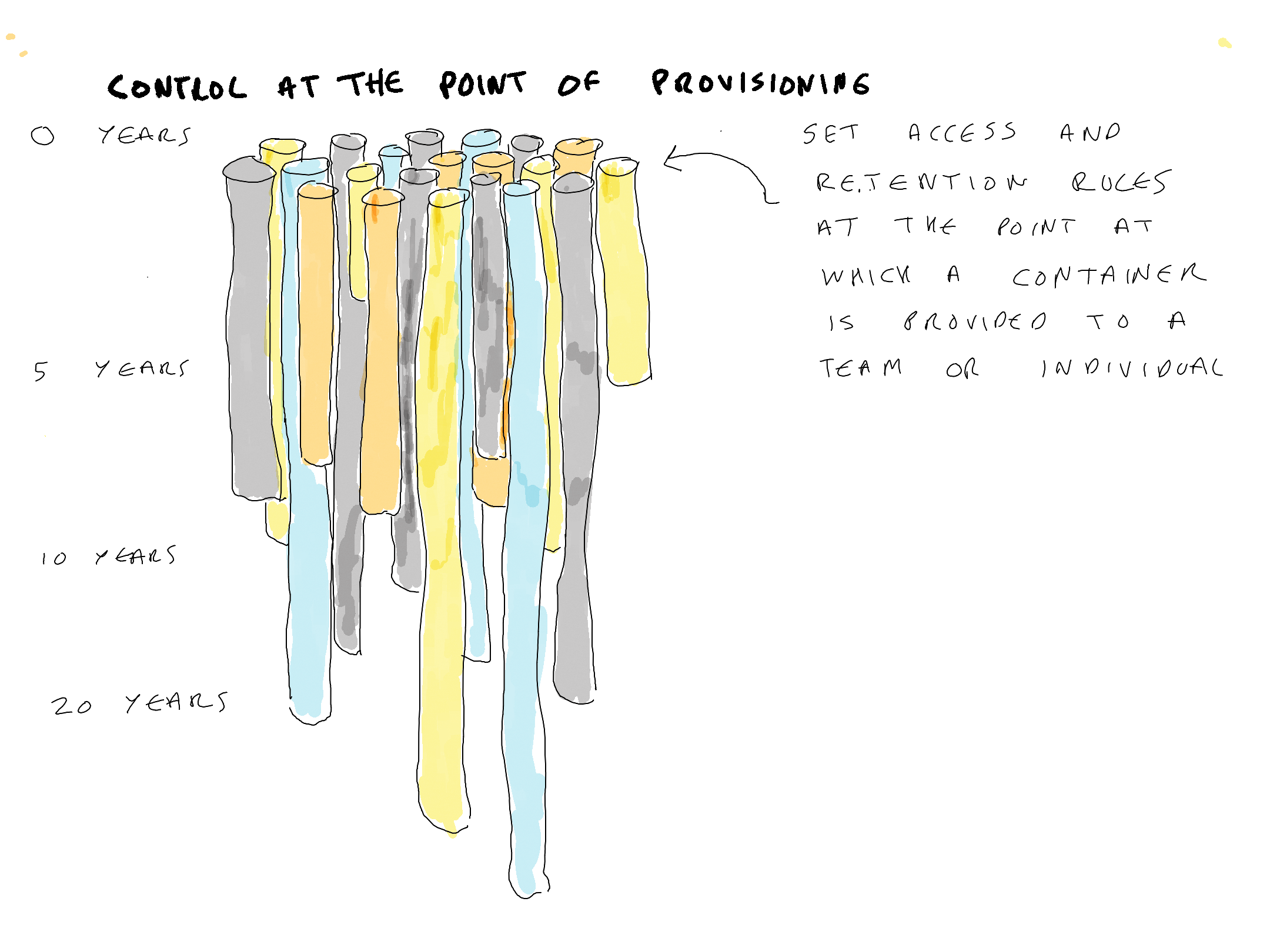
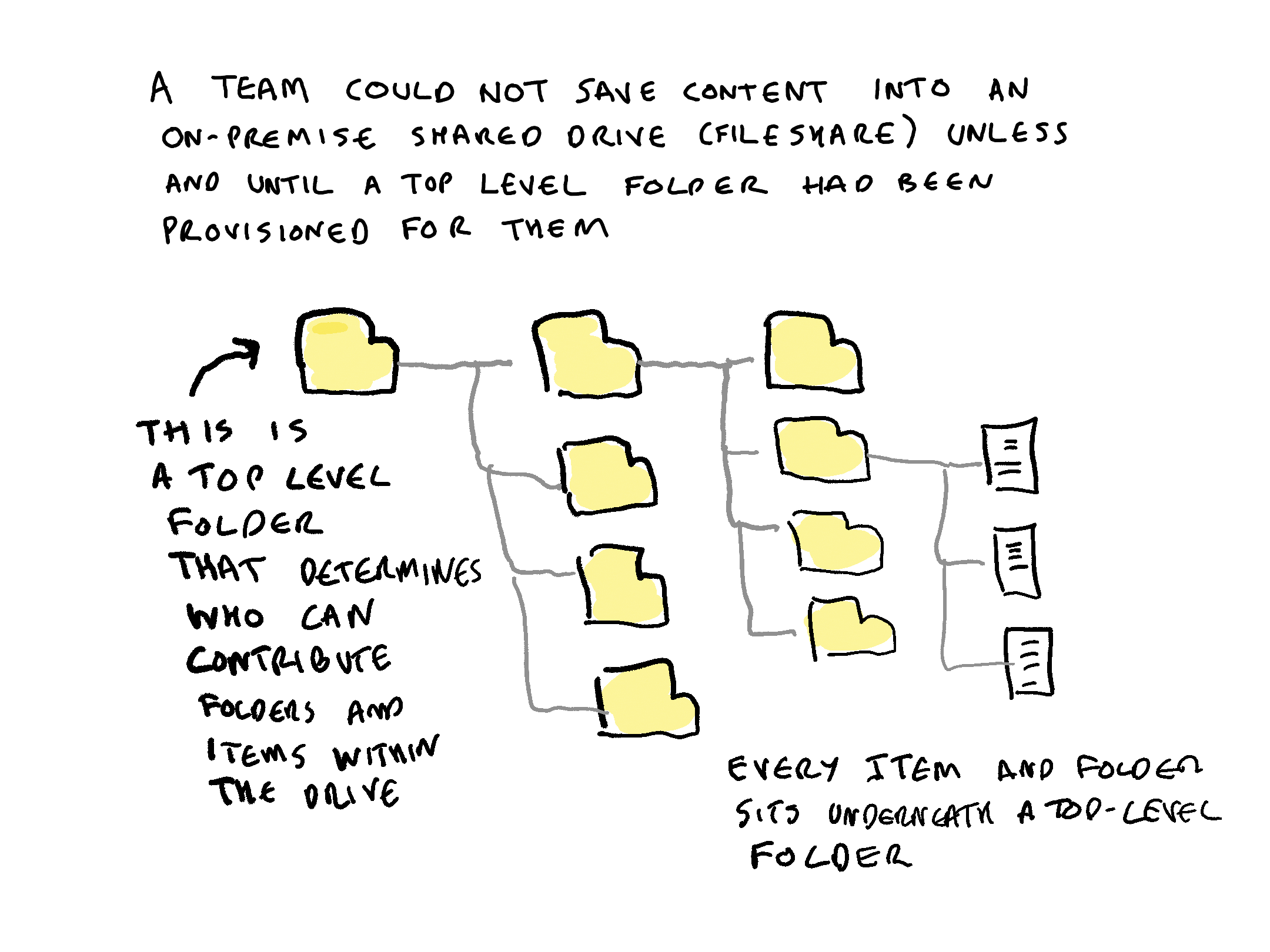
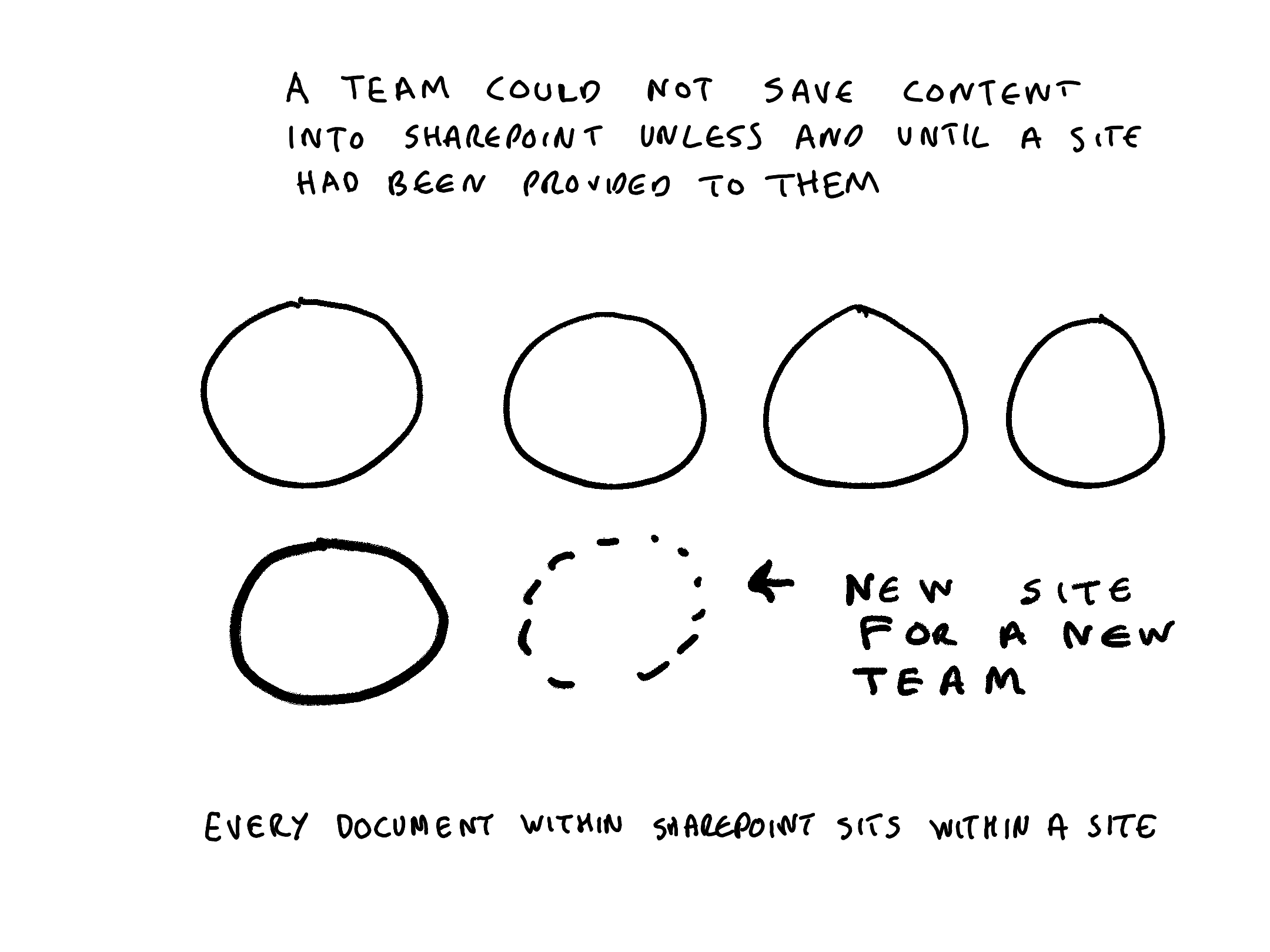
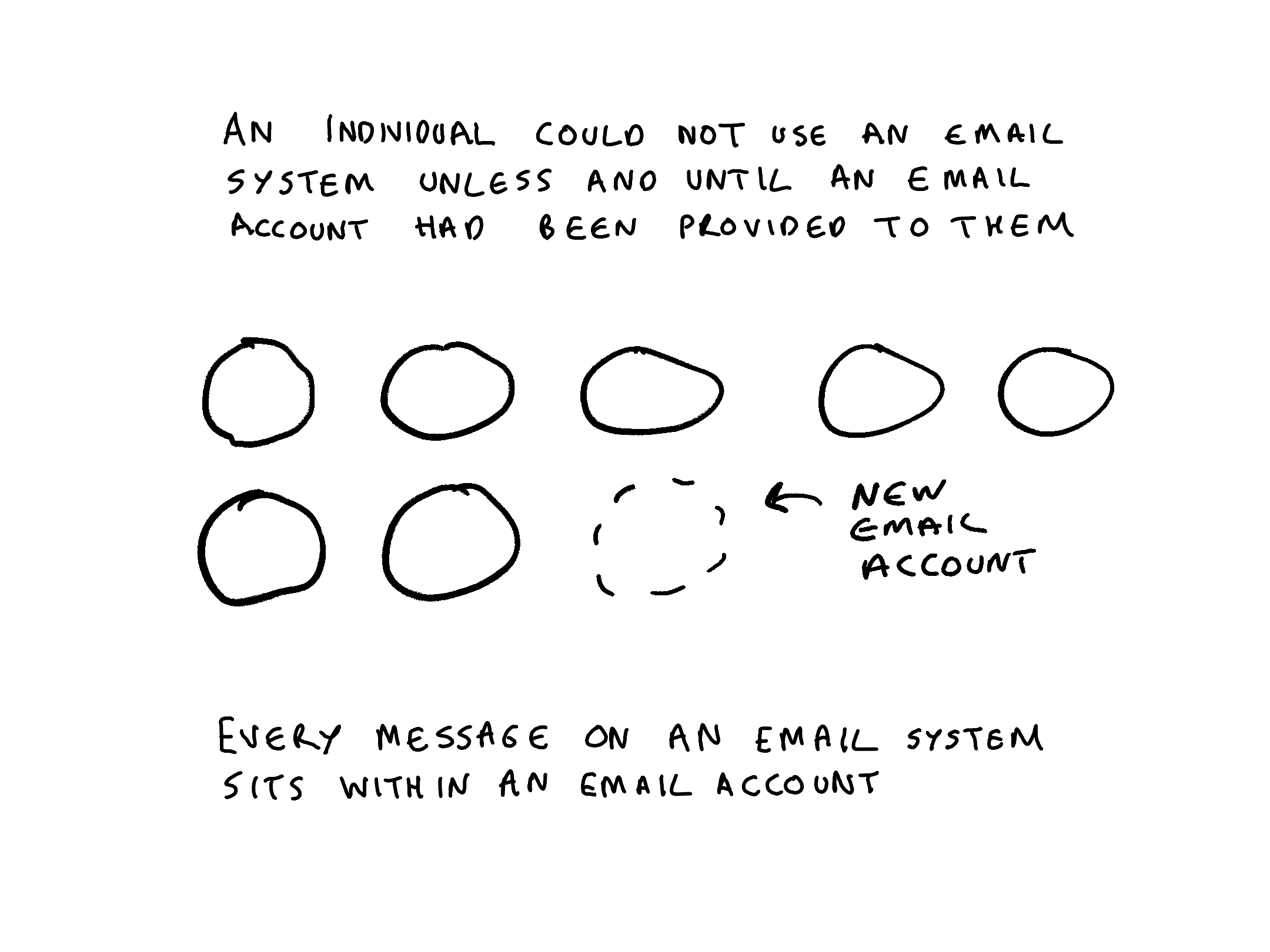
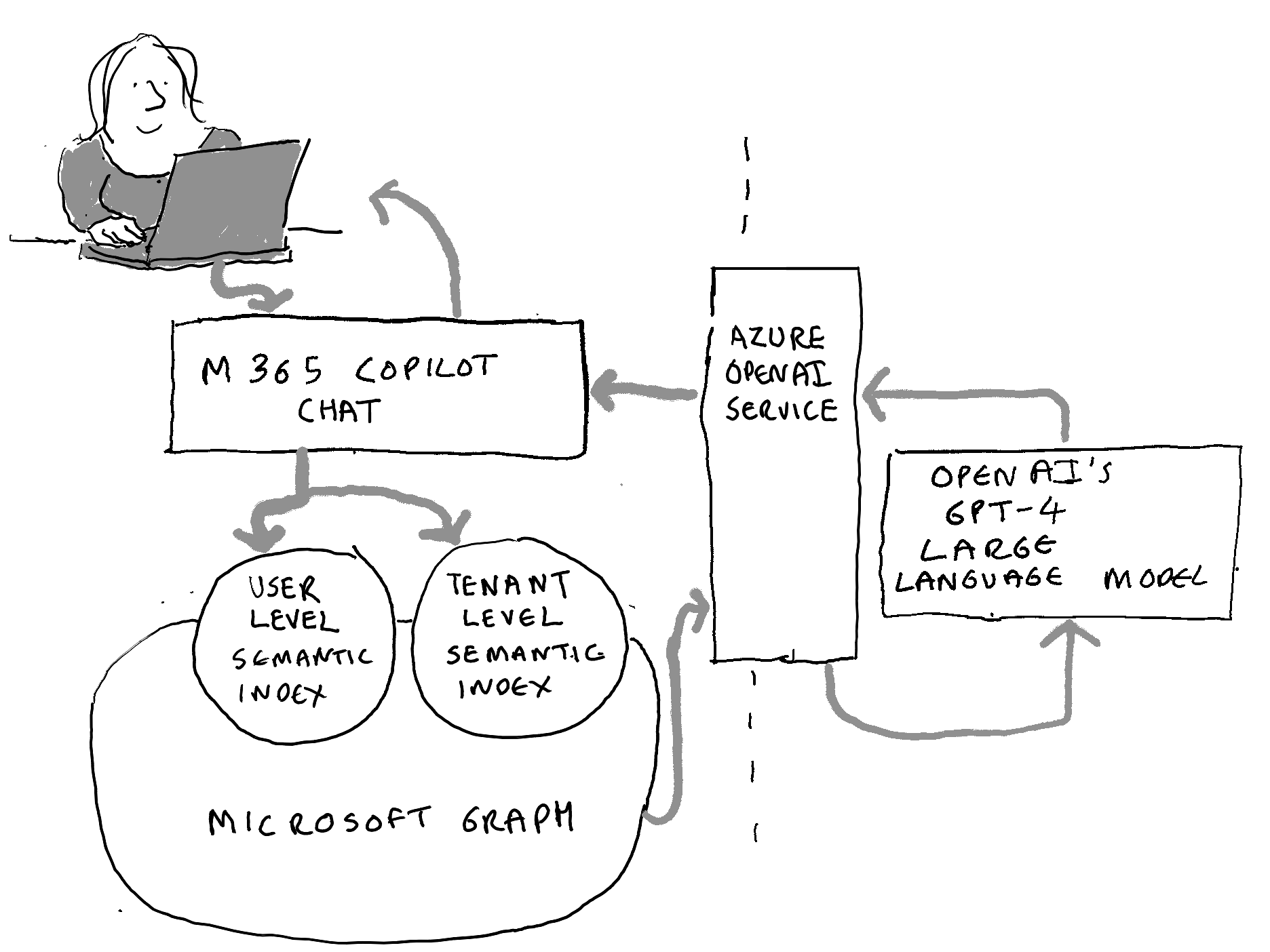
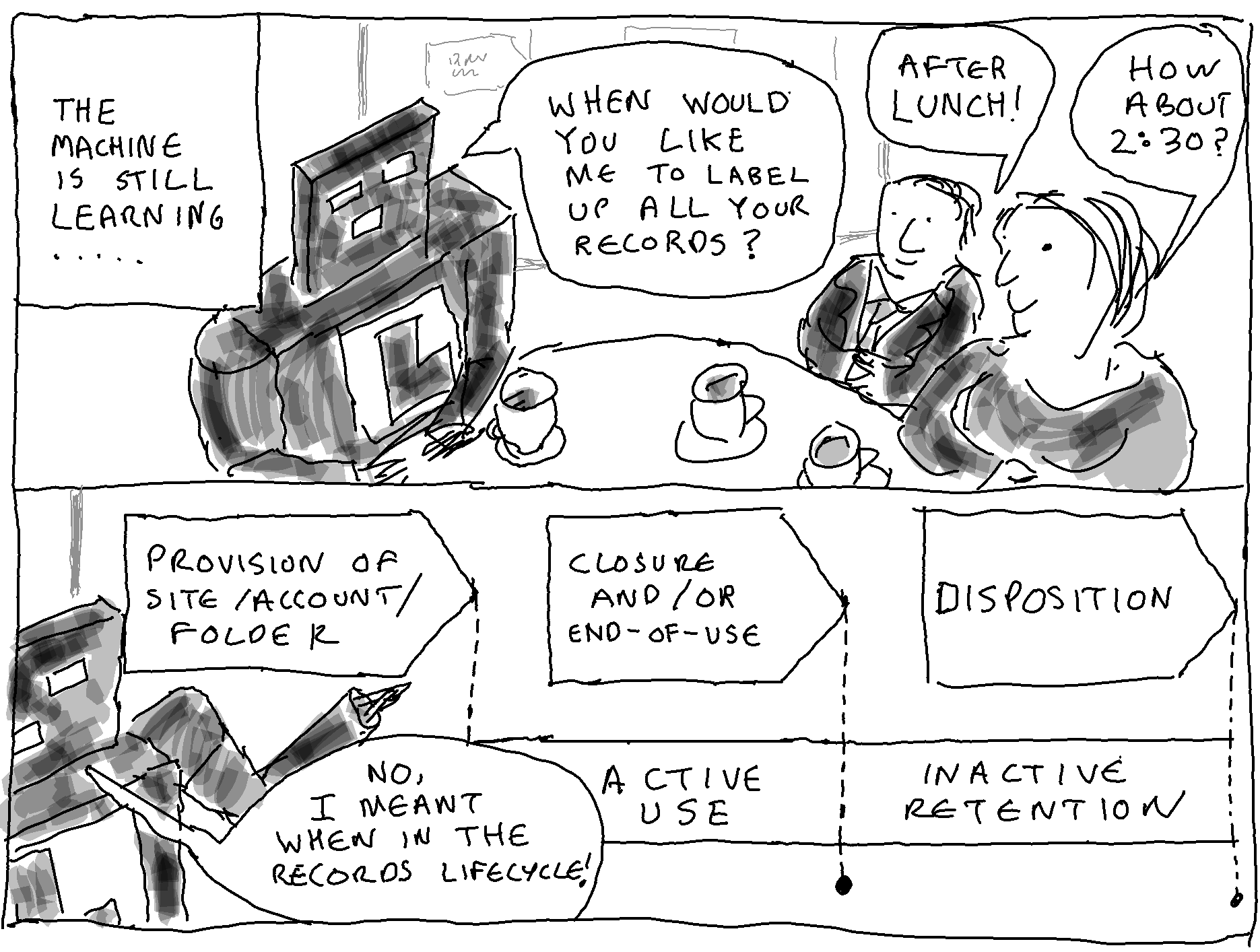
 Thinking Records