The use of unstructured data as an input to generative AI processes
Microsoft 365 Copilot is an example of a ‘retrieval augmented generation’ (RAG) system. RAG systems are a way for organisations to use the generative AI capabilities of external large language models in conjunction with their own internal information. M365 Copilot enables an individual end-user (once they have a licence) to use the capabilities of one of OpenAI’s large language models in conjunction with the content they have access to within their M365 tenant.
The basic idea of a RAG system is that an end-user prompt is ‘augmented’ with relevant information from one or more sources (typically from a database or other information system within an organisation’s control). The augmented prompt is then sent to the large language model for an answer. A rigid separation is maintained between the large language model and the organisational information systems used to augment the prompt.
Retrieval augmented generation systems aim to harness the advantages of large language models (their creative power, ability to manipulate language and vast knowledge) whilst mitigating their main disadvantages (their tendency to hallucinate, their ignorance of their own sources, and the likelihood they have not been allowed to learn anything new since they finished their training).
Many RAG systems will use a structured database as their source for augmenting the large language model. Such a structured database will act as a ‘single source of truth’ within the organisation on the matters within its scope.
The interesting thing about M365 Copilot is that it is using the unstructured data in an organisation’s document management, collaboration, and email environments (SharePoint, Teams and Exchange) as the source of content to augment each end-user prompt.
These environments do not function as a single source of truth inside an organisation. They will contain information in some items (documents/messages etc.) that is contradicted or superceded by information in other items.
Using unstructured data as the source for a RAG system poses two key challenges for the system provider:
- The system must respect the access permissions within those unstructured data repositories;
- The system must be provided with a way to determine what content is most relevant (and what is less relevant, or irrelevant) to any particular prompt.
M365 Copilot is not seeking to change access permissions or retention rules. In fact those access permissions and retention rules can be seen as guardrails on the operation of M365 Copilot.
The component parts of Microsoft 365 Copilot
M365 Copilot itself has a relatively small footprint within an M365 tenancy. It adds just three types of thing to your M365 tenant – namely:
- Some new elements to the user interface of the different workloads and applications (Teams, Outlook, PowerPoint, Word etc) to enable individuals to engage with M365 Copilot and enter prompts for Copilot to answer;
- A set of semantic indexes that Copilot can search when an end-user enters a prompt. When an organisation starts using M365 Copilot a tenant level semantic index is built that indexes the content of all the SharePoint sites in the tenant. Every time they purchase a licence for a new individual user a new user level semantic index is built of all the content accessible to that user in their own individual accounts, together with any documents that have been specifically shared with the individual;
- Tools (such as the Copilot dashboard and the Copilot Usage report) that enable administrators to monitor how Copilot is being used.
The reason that Microsoft have needed to add so little to the tenant is that M365 Copilot works with three pre-existing components, namely:
- The Microsoft Graph, which is a pre-existing architectural feature of every Microsoft 365 tenant. In essence it a searchable index of all the content held within the tenant and all the interactions that have taken place within the tenant. Copilot’s new semantic indexes are built on top of the existing Microsoft Graph;
- A group of large language models (of which the most important at the time of writing is GPT-4) that sits outside of any Microsoft 365 tenancy. They are owned and built by OpenAI, but they sit on the Microsoft Azure cloud platform.
- An API layer to govern and facilitate the exchange of information between your tenancy and the external large large language model. Microsoft 365 Copilot uses Azure OpenAI Service to fulfill this role. The purpose of the Azure OpenAI Service component (and the contractual terms that underpin it) is to prevent the use of the information provided to the large language model being used by OpenAI to retrain the model or train new models. This is important in order to maintain the separation between the information in your tenant and the large language models that OpenAI and others make available to consumers and businesses.
This Azure OpenAI service is an outcome of the partnership between Microsoft and OpenAI. OpenAI is a AI research lab that has developed the GPT series of large language models. They offer those models in consumer services (like Chat GPT) and to businesses. Microsoft hosts the GPT models on its Azure cloud platform and is a major provider of funding to OpenAI.
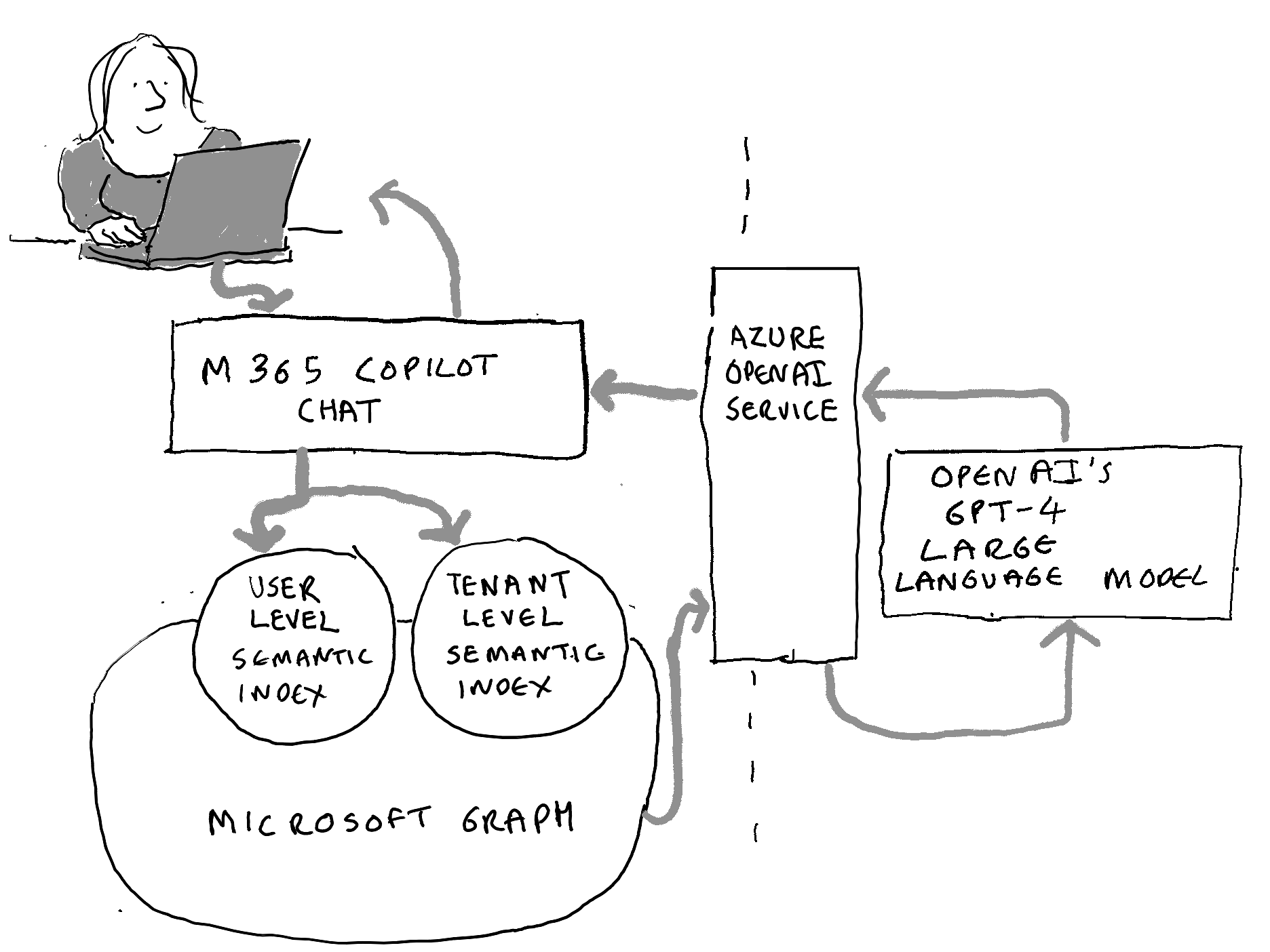
The illustration above shows what happens when an individual enters a prompt into Microsoft 365 Copilot Chat:
- The prompt is sent to both the user level semantic index (of content specific to that individual) and the tenant wide semantic index (of all SharePoint content);
- The semantic indexes develop a targeted search of Microsoft Graph to find information relevant to the individual’s prompt;
- Copilot sends the prompt, enriched with the information found in Micorosft Graph, to Azure Open AI services;
- Azure Open AI Services opens a session with one of OpenAIs large language models (typically GPT-4, which also serves as one of the models behind OpenAI’s consumer Chat GPT service);
- GPT-4 provides a response;
- Azure Open AI Services closes the session with GPT-4 without letting OpenAI keep the information that was exchanged during the session;
- Azure Open AI Services provides a response back to M365 Copilot, which does some post-processing and provides it to the end user.
 Thinking Records